.jpeg)


Was Restaurant-Inventuren auf Gruppenebene zum Scheitern bringt – und wie man es behebt
Wo Inventuren in Gruppen mit mehreren Standorten tatsächlich scheitern
Inventuren in Gruppen mit mehreren Standorten scheitern, wenn ein Prozess, der für einen sorgfältigen Zähler an einem Standort entwickelt wurde, auf die Realität von Dutzenden von Mitarbeitern trifft, die in einer Nacht verschiedene Bereiche an vielen Standorten zählen. Die Inventur, die zeigen soll, wo Geld verloren geht, liefert stattdessen Zahlen, denen niemand vertraut: Nicht gezählte Artikel erscheinen als null, die Abweichung wird gegen eine veraltete Zahl gemessen, und es gibt keine einheitliche Übersicht für die Gruppe.
Jeder Betreiber kennt denselben Montagmorgen. Mehrere Standorte haben ihre wöchentliche Inventur über das Wochenende eingereicht, die Zahlen sind in einer Tabelle gelandet, und keine stimmt mit dem überein, was die Küchen tatsächlich vorhalten. Die Abweichung an einem Standort sieht unmöglich aus. Ein anderer hat überall null, weil jemand zu früh auf Absenden gedrückt hat. Ein dritter hat die Hälfte des Kühlhauses nie gezählt. Was dazu gedacht war, Verluste aufzudecken, hat ein neues Problem geschaffen: Jetzt vertrauen Sie keiner der Zahlen mehr und können nicht erkennen, welche Standorte wirklich abweichen und welche einfach schlecht gezählt haben.
Eine einzige fehlerhafte Inventur an einem Standort ist ein Ärgernis. Derselbe Fehler, der sich an jedem Standort, jede Woche wiederholt, vergiftet leise jede nachgelagerte Zahl – vom Wareneinsatz-Anteil bis zu dem, was Sie als Nächstes nachbestellen. Wenn Sie Inventuren an mehr als einer Handvoll Standorte durchführen, lautet die Frage nicht, ob diese Lücken existieren, sondern welche Sie am meisten kosten – fast alle haben eine gemeinsame Ursache: Werkzeuge, die für eine einzelne Inventur an einem einzigen Standort entwickelt und nie für eine Gruppe angepasst wurden. Die acht Fehlermodi unten benennen jede Lücke, ihre betriebliche Konsequenz und die Fähigkeit, die sie schließt.
Die Inventur-Fehlermodi, die Gruppen mit mehreren Standorten am meisten kosten
Hier sind die spezifischen Arten, wie Inventuren in Gruppen im großen Maßstab scheitern – jede basiert auf dem, was Betreiber tatsächlich erleben, gepaart mit dem, was ein Inventurprozess tun muss, um es zu verhindern.
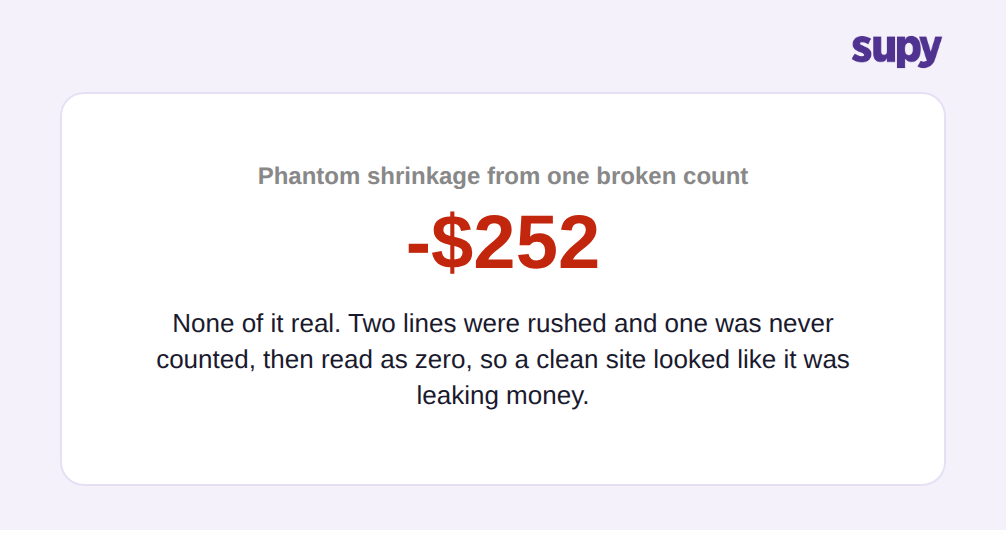
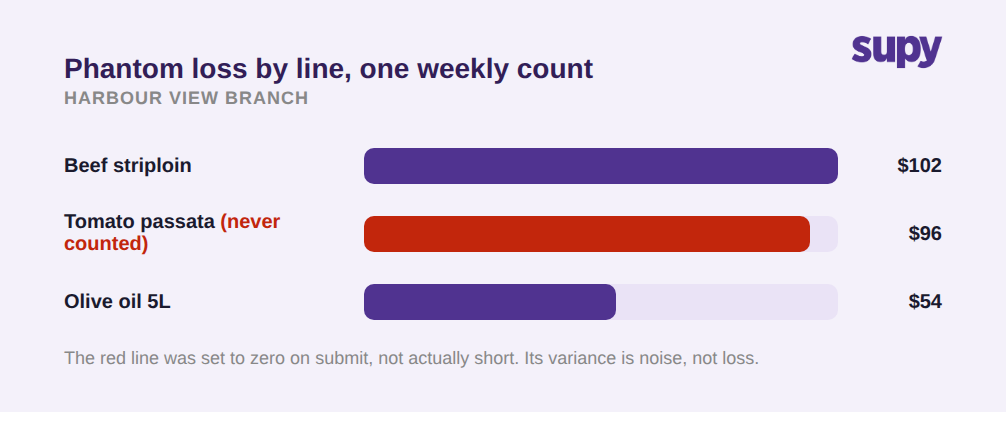
- Nicht gezählte Artikel werden stillschweigend zu null. Viele Inventur-Werkzeuge setzen beim Absenden standardmäßig jeden nicht gezählten Artikel auf null. An einem großen Standort teilt ein Zähler, der keine Zeit mehr hat oder zu früh auf Absenden drückt, dem System mit, dass der gesamte nicht gezählte Abschnitt keinen Bestand hat. Am nächsten Tag ist der theoretische Bestand falsch, der Abweichungsbericht ist unbrauchbar, und die Nachbestellvorschläge basieren auf Phantomengpässen. Die Lösung ist ein Inventurprozess, der „nicht gezählt" und „als null gezählt" als unterschiedliche Zustände behandelt: Nicht gezählte Positionen sollten markiert und ausgeschlossen werden, niemals als leer angenommen, und die Option zum Nullauffüllen sollte sich abschalten lassen, keine versteckte Standardeinstellung.
- Niemand kann erkennen, wie weit die Inventur tatsächlich abgeschlossen ist. Ohne einen Fertigstellungsprozentsatz oder einen Filter für noch nicht gezählte Positionen hat ein Manager, der Inventuren an mehreren Standorten genehmigt, keine Möglichkeit zu sehen, dass ein Standort nur teilweise fertig und ein anderer vollständig ist. Halb fertige Inventuren werden eingereicht und als endgültig behandelt. Jedes Werkzeug, das Sie im großen Maßstab einsetzen, muss den Fertigstellungsstand auf einen Blick anzeigen und dem Zähler ermöglichen, direkt zu den noch ausstehenden Artikeln zu filtern, sodass eine unfertige Inventur vor der Genehmigung offensichtlich ist – und nicht erst, nachdem die Zahlen bereits falsch sind.
- Zähler arbeiten blind, ohne Live-Bewertung. Wenn der Zählbildschirm nur Mengen anzeigt und nie den laufenden Wert des gezählten Bestands, geht ein offensichtlicher Fehler – Hunderte von Dosen statt Zehner – glatt durch, weil nichts auf dem Bildschirm beunruhigend aussieht. Eine Live-Bewertung während der Zählung macht den Zähler zur ersten Verteidigungslinie: Eine Zahl, die plötzlich um Tausende steigt, wird im Regal entdeckt, nicht drei Tage später in einer Abweichungsbesprechung.
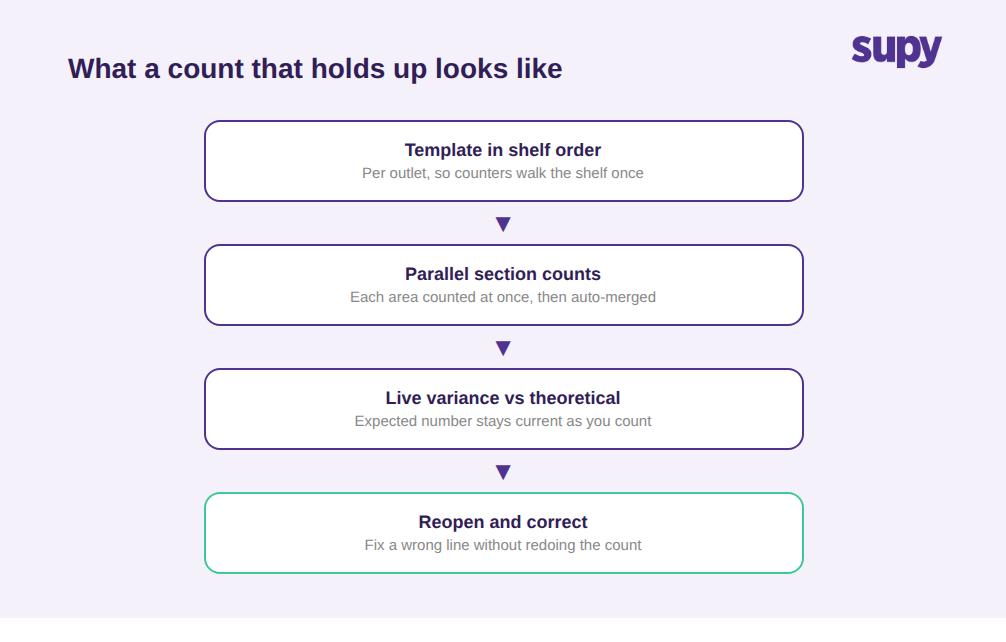
- Die Inventurvorlage kämpft gegen den Zähler. Eine Vorlage, die nicht in Regalreihenfolge ist, zwingt Zähler, im Lager hin und her zu laufen; eine, die nicht für die jeweilige Filiale spezifisch ist, listet Artikel auf, die der Standort gar nicht führt; und eine ohne Suchfunktion und ohne druckbares Leerblatt lässt Zähler unvorbereitet und unfähig, irgendetwas zu finden. All das macht Inventuren langsam und fehleranfällig. Das Inventur-Tool von Supy verwendet wiederverwendbare Vorlagen in Regalreihenfolge, die für jede Filiale spezifisch erstellt wurden, sodass Zähler das Regal einmal durchgehen, statt in einer irrelevanten Gesamtliste zu suchen – das macht einen großen Teil der genannten Reduzierung der Zählzeit um mehr als 50 % aus.
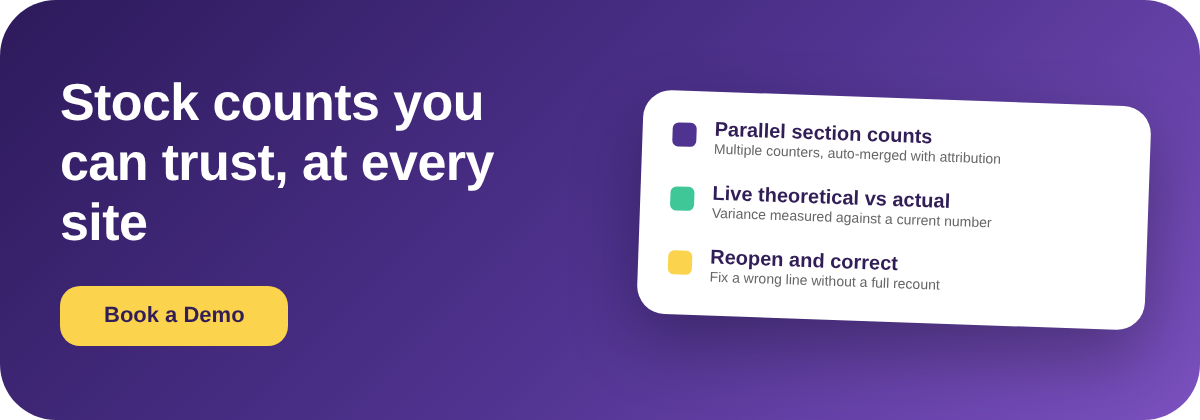
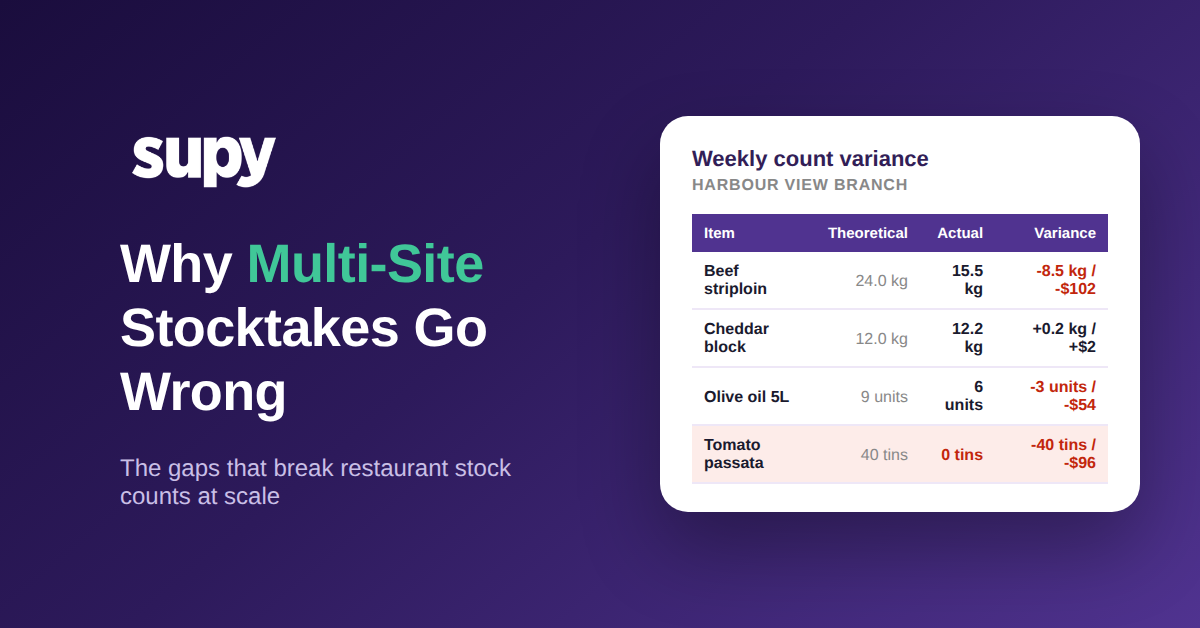
- Die Abweichung wird gegen eine veraltete Zahl gemessen und bedeutet daher nichts. Eine Inventur liefert nur dann eine verlässliche Abweichung, wenn der erwartete (theoretische) Bestand des Systems zum Zeitpunkt der Zählung aktuell ist. Wenn der theoretische Bestand nicht kontinuierlich aus jeder Lieferung und jedem Rezeptverkauf aktualisiert wird, erhalten Sie die Differenz zwischen einer echten Zählung und einer veralteten Schätzung – das sagt Ihnen nichts über tatsächliche Verluste aus. Supy hält den theoretischen Bestand aktuell und aktualisiert ihn bei jedem Wareneingang und jedem Rezeptverbrauchsereignis, sodass die Abweichung zur Inventurzeit gegen eine wirklich aktuelle Erwartungszahl gemessen wird – und nicht gegen eine veraltete.
- Eine eingereichte Inventur sperrt einen Fehler dauerhaft ein. In Werkzeugen, bei denen das Absenden endgültig ist, ist ein Eingabefehler oder ein falsch abgelesenes Regal in den Datensatz eingebacken und verzerrt den Bestand leise, bis es jemand Wochen später bemerkt. Inventuren müssen korrigierbar sein: Ein autorisierter Benutzer sollte eine eingereichte Inventur wieder öffnen und die spezifische Position korrigieren können, mit nachverfolgter Änderung, damit ein einzelner Fehler kein dauerhaftes Loch in Ihre Zahlen reißt. Supy unterstützt das Wiederöffnen einer eingereichten Inventur zur Korrektur, anstatt eine vollständige Neuinventur zu erzwingen.
- Eine Person muss den gesamten Standort zählen. Wenn nur ein Zähler gleichzeitig an einer Inventur arbeiten kann, dauern große Standorte Stunden, Inventuren werden gegen Ende gehetzt, und Abschnitte werden übersprungen, um die Frist einzuhalten. Paralleles Zählen behebt den Engpass: Mehrere Teammitglieder zählen gleichzeitig ihre eigenen Abschnitte, jede Teilinventur ist auf ihren Besitzer gesperrt, und die Plattform führt die Ergebnisse mit Attribution zusammen – ein großer Standort wird in einem Bruchteil der Zeit gezählt, und Sie können sehen, wer was gezählt hat, wenn eine Zahl seltsam aussieht.
- Jeder Standort führt seine Inventur auf eigene Weise durch. Das strukturellste Scheitern ist nicht eine einzelne Funktionslücke – es ist Fragmentierung: separate Inventur-Werkzeuge oder Tabellen pro Standort, sodass es keine einheitliche, konsistente Bestandsübersicht für die Gruppe gibt. Die Zentrale kann keine Standorte vergleichen, keine Inventuren zusammenführen und kann nicht sicher sein, dass „gezählt" überall dasselbe bedeutet. Die Lösung ist ein einheitlicher Inventurprozess auf einer einzigen Plattform für alle Standorte, sodass eine Zahl auf Gruppenebene tatsächlich existiert und an jedem Standort auf dieselbe Weise erstellt wird.
Wie Sie herausfinden, welcher dieser Fehler in Ihrer Gruppe vorkommt
Sie müssen nicht raten, welcher Sie am meisten kostet. Rufen Sie die Inventuren der letzten Woche von zwei oder drei Standorten ab und führen Sie eine schnelle Selbstdiagnose durch. Schauen Sie zunächst nach Positionen, die genau null zurückgekommen sind: Wenn ein Standort keinen der Artikel hat, die er eindeutig nutzt, setzen Sie höchstwahrscheinlich nicht gezählte Bestände auf null (Fehler eins). Prüfen Sie zweitens, ob eine Inventur genehmigt wurde, bevor sie abgeschlossen war; wenn Sie das nicht einmal erkennen können, haben Sie die Fertigstellungs-Sichtbarkeitslücke (Fehler zwei). Nehmen Sie drittens Ihre drei größten Abweichungen und fragen Sie, ob der theoretische Bestand beim Durchführen der Inventur aktuell war; wenn nicht, ist diese Abweichung Rauschen, kein Signal (Fehler fünf). Zählen Sie schließlich, auf wie viele verschiedene Arten Ihre Standorte eine Inventur tatsächlich erfassen: Mehr als eine ist das Fragmentierungsproblem (Fehler acht), und es ist normalerweise dasjenige, das zuerst behoben werden sollte, weil es jede andere Lücke unsichtbar macht.
Die nächste Maßnahme ist eng, keine vollständige Systemüberholung: Beheben Sie den einzelnen Fehlermodus, der die meisten Zahlen verfälscht, standardisieren Sie dieses Element standortübergreifend und führen Sie dann im nächsten Monat die Diagnose erneut durch. Für die meisten Gruppen ist der größte unmittelbare Gewinn, den theoretischen Bestand aktuell zu halten und zu verhindern, dass nicht gezählte Artikel als null gelesen werden, da diese beiden dafür sorgen, dass eine ansonsten ehrliche Inventur falsche Zahlen liefert. Für die damit zusammenhängenden strukturellen Fragen lesen Sie, wie Gruppen mit dem Inventarbestand pro Filiale im Vergleich zum gemeinsamen Lager umgehen und warum Maßeinheitsumrechnungen den Bestand und die Kostenzahlen in der Gruppe leise verfälschen.