.jpeg)


POS und Restaurant-Manager-Software: Warum eine Suche zwei verschiedene Systeme verbirgt
Was mit „POS-Restaurant-Manager“-Software tatsächlich gemeint ist
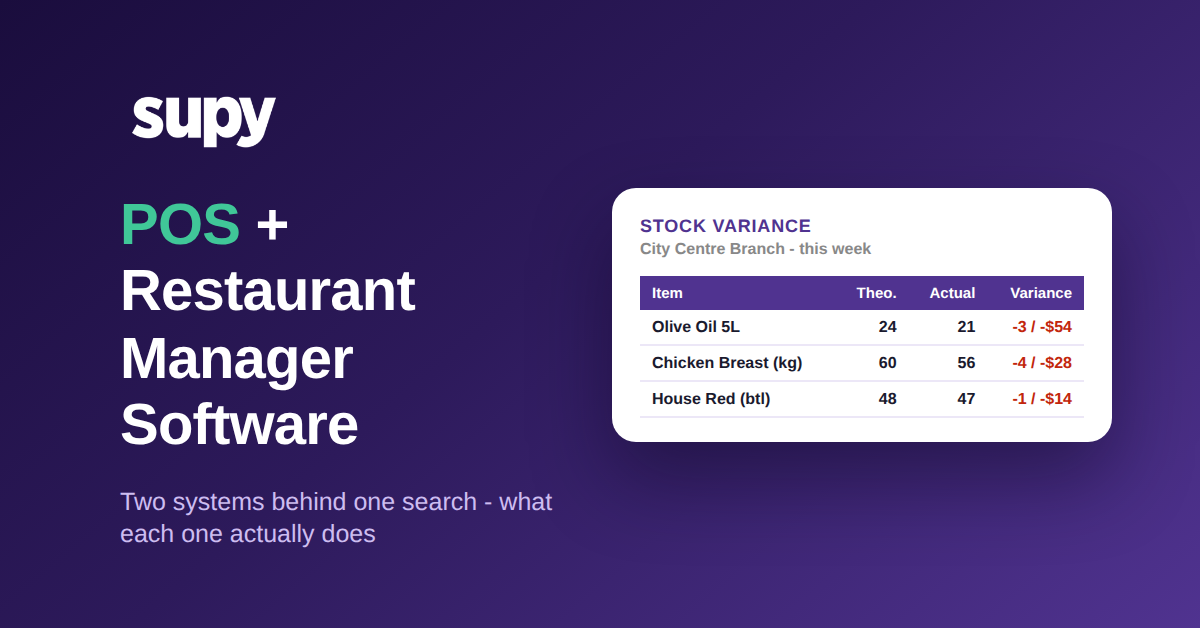
Geben Sie diesen Begriff in eine Suchmaschine ein, und die Ergebnisse widersprechen sich, denn er verweist auf eines von zwei verschiedenen Produkten: eine Kassensoftware (POS), die einige Back-Office-Verwaltungsfunktionen bündelt, oder ein dediziertes Management-System, das ein Restaurant-Manager neben dem POS betreibt, um Bestand, Beschaffung, Rezeptkosten und Berichte zu verwalten. Der POS erfasst, was an der Kasse verkauft wurde; die Management-Ebene erklärt, was dieser Verkauf mit Ihrem Bestand, Ihrer Marge und Ihrer nächsten Bestellung gemacht hat.
Der Unterschied ist wichtig, weil beide Produkte unterschiedlich bepreist, vermarktet und eingeführt werden. Eine gebündelte POS-Suite wird von demjenigen gekauft, der die Vorderseite des Hauses und das Zahlungsterminal verantwortet. Ein dediziertes Management-System wird von demjenigen gekauft, der für den Wareneinsatz und die Beschaffung zuständig ist. In einem Einzelstandort-Café kann das dieselbe Person sein, sodass das Bundle übersichtlich wirkt. Über eine Gruppe hinweg ist das selten der Fall, und das „Manager“ in der Suche fragt meist, welches System das Problem auf seinem Schreibtisch löst – nicht, welche Kassenmarke installiert werden soll. Die erste Frage ist also nicht, welches Produkt zu kaufen ist, sondern welches der beiden Sie tatsächlich suchen.
| POS mit integriertem Back-Office | Management-System neben dem POS | |
|---|---|---|
| Was es ist | Eine Kasse mit einigen Bestands- und Berichts-Tabs | Dedizierte Bestands-, Kosten- und Lieferantensoftware |
| Wer sucht | Inhaber oder Front-of-House-Lead | Der Manager, der für den Wareneinsatz verantwortlich ist |
| Besonders stark bei | Ein Login für Verkauf und Zahlungen | Umfassende Bestands-, Kosten- und Beschaffungskontrolle |
| Der Haken | Begrenzte Back-Office-Tiefe auf Gruppenebene | Benötigt einen Live-Verkaufsfeed vom POS |
Wo der POS endet und das Management-System beginnt
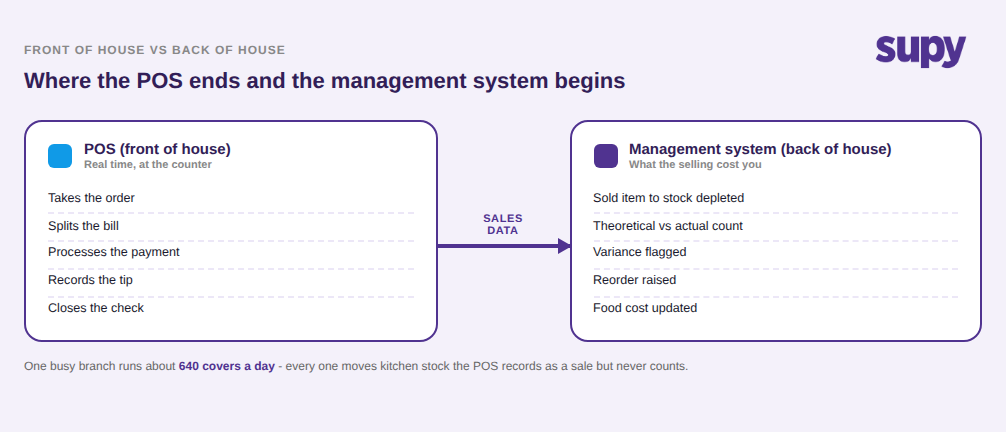
Die präzise Art, darüber nachzudenken, ist Front-of-House versus Back-of-House. Der POS gehört der Transaktion: Er nimmt die Bestellung auf, teilt die Rechnung, verarbeitet die Zahlung, erfasst das Trinkgeld und schließt den Check. Alles, worin er exzellent ist, findet an oder nahe der Kasse statt – in Echtzeit, vor einem Gast.
Das Management-System gehört allem, was aufgrund dieser Transaktionen passiert, aber nicht an der Kasse. Wenn ein Burger verkauft wird, erfasst der POS den Verkauf; die Management-Ebene ist es, die diesen verkauften Burger in 150 Gramm Rindfleisch, ein Brötchen und eine Scheibe Käse verwandelt, die den Bestand verlassen – und dann diesen theoretischen Verbrauch mit einer physischen Zählung abgleicht, die Abweichung markiert und in eine Nachbestellung und eine Wareneinsatz-Zahl einfließen lässt. Der POS weiß, was die Kasse verlassen hat. Das Management-System weiß, was die Küche verlassen hat und was es gekostet hat. Eine Gruppe, die den POS als ihr Bestands- und Kostensystem behandelt, arbeitet wirklich nur mit Verkaufsdaten – die gesamte Back-of-House-Hälfte des Bildes fehlt. Die Frage, die zu stellen ist: Ist das, was Sie Ihr „System“ nennen, wirklich nur Ihr POS, der eine zweite Aufgabe erfüllt, für die er nie gebaut wurde?
Wie Verkaufsdaten die beiden verbinden – und warum diese Verbindung nicht automatisch ist
Die beiden Ebenen verbinden sich durch eine Sache: Verkaufsdaten, die vom POS in das Management-System fließen, wo jeder verkaufte Artikel in den Bestand umgewandelt wird, den er verbraucht hat. Dieser eine Feed ist die Brücke – und „es integriert mit Ihrem POS“ kann still drei sehr unterschiedliche Brücken bedeuten. Eine Nur-Export-Verbindung sendet Daten aus dem POS für Berichte, zieht aber nichts zurück, sodass Ihr Management-System seine Verkäufe immer noch durch manuellen Upload erhält. Ein einseitiger Live-Feed sendet abgeschlossene Verkäufe automatisch in das Management-System. Eine bidirektionale Synchronisierung tut das und schreibt Informationen auch zurück in den POS. Bevor Sie annehmen, dass die beiden Systeme kommunizieren, bestätigen Sie, welche der drei Varianten Ihnen tatsächlich angeboten wird, denn das Wort „Integration“ deckt alle ab.
Selbst ein Live-Feed ist nicht das Ende der Arbeit. Jeder Artikel im POS muss dem Rezept und dem Bestandsartikel zugeordnet werden, den er im Management-System repräsentiert, und alles, was nicht zugeordnet ist, verbraucht schlicht nichts – was still unterschätzt, wie viel Bestand und Umsatz sich bewegt haben. Eine Speisekarte, die nur teilweise zugeordnet ist, produziert Zahlen, die präzise wirken und falsch sind. Und manche POS-Plattformen, insbesondere Nischen- oder Regionalsysteme, bieten gar keine verwendbare Integration – was für viele Gruppen das größte Hindernis zwischen ihnen und einem genauen Back-Office ist. Wenn Sie die Mechanik dieses Feeds und seine Bruchstellen verstehen möchten, geht unser Leitfaden zu Integrationen von Warenwirtschaftssoftware für Restaurants tiefer, als wir hier können. Bevor Sie „es integriert“ für bare Münze nehmen: Fragen Sie, welche der drei Brücken Ihnen angeboten wird und wer das Artikel-Mapping übernimmt, sobald sie live ist.
| Was Ihnen angeboten wird | POS-Verkäufe fließen EIN? | Was manuell bleibt |
|---|---|---|
| Nur-Export – Daten verlassen den POS für Berichte | 0 % – keiner | Verkäufe jedes Tages manuell als CSV hochladen |
| Einseitiger Live-Feed – POS zu Management, automatisch | 100 % – automatisch | Jeden POS-Artikel einmalig seinem Rezept zuordnen |
| Bidirektionale Synchronisierung – speist ein und schreibt zurück in den POS | 100 % + Rückschreiben | Artikel-Mapping aktuell halten, wenn sich die Speisekarte ändert |
Wenn Sie der Manager sind: Wählen Sie das Tool für die Aufgabe
Wenn Sie derjenige sind, der sucht, ist der schnellste Weg aus der Mehrdeutigkeit, das Problem zu benennen, das Sie lösen möchten, und zu sehen, welche Ebene es besitzt. Langsamer Service an der Kasse, Rechnungsaufteilung, Zahlungsarten und Gastdurchsatz sind POS-Probleme – keine Warenwirtschaftssoftware löst sie. Stockausfall mitten im Service, ein Wareneinsatz, der sich verschiebt, Rechnungen, die nicht mit dem Gelieferten übereinstimmen, und Bestellungen nach Gefühl sind Management-Ebenen-Probleme – eine bessere Kasse löst sie nicht.
Die meisten Gruppen brauchen am Ende beides, weil die beiden wirklich unterschiedliche Aufgaben lösen. Was sie nicht tun sollten, ist eines kaufen und erwarten, dass es das andere ist. Ein POS, der in der Hoffnung gekauft wird, auch den Wareneinsatz zu kontrollieren, lässt das Back-of-House auf Tabellenkalkulation laufen; ein Management-System, das ohne Prüfung, ob es die Verkäufe des POS tatsächlich verarbeiten kann, gekauft wird, lässt Sie Zahlen manuell eintippen. Der Suchbegriff verwischt beides, aber die Kaufentscheidung muss sie auseinanderhalten. Benennen Sie also das Problem, das Sie jetzt am meisten kostet, und lassen Sie das entscheiden, welche Ebene Sie zuerst suchen.
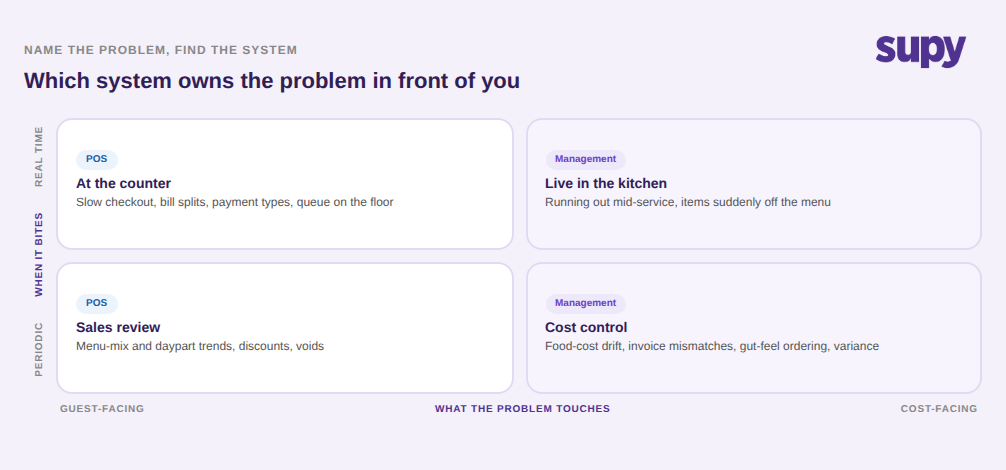
Bevor Sie irgendetwas in die engere Wahl nehmen, klären Sie die Suche mit vier Fragen. Erstens: Welches Problem kostet Sie gerade tatsächlich Geld – ein Front-of-House- oder ein Back-of-House-Problem? Das sagt Ihnen, mit welcher Ebene Sie anfangen sollen. Zweitens: Wenn es ein Back-Office-Problem ist, verarbeitet das Management-System, das Sie in Betracht ziehen, Ihren spezifischen POS als Live-Feed – nicht nur als Export? Drittens: Wird Ihr POS-Anbieter die Verkaufsdaten überhaupt freigeben, denn manche tun es nicht? Viertens: Wer ist für das Mapping der POS-Artikel auf den Bestand verantwortlich, und wie viel der Speisekarte muss zugeordnet sein, bevor den Zahlen vertraut werden kann? Beantworten Sie das, und das Zwei-Systeme-hinter-einer-Suche-Problem hört auf, eine Quelle der Verwirrung zu sein, und wird zu einer klaren, geordneten Entscheidung.
Supy ist die Back-of-House-Management-Ebene, die auf Ihrem POS sitzt und Verkäufe über jeden Standort hinweg in Live-Bestand, Kosten und Lieferantenkontrolle verwandelt. Erfahren Sie, wie es Verkaufs- und POS-Integrationen handhabt, oder Demo buchen, um es mit Ihrer eigenen Speisekarte zu erkunden.