Food cost
Menu engineering

Multiple Restaurant Brands: Manage Every Menu and Recipe in One System
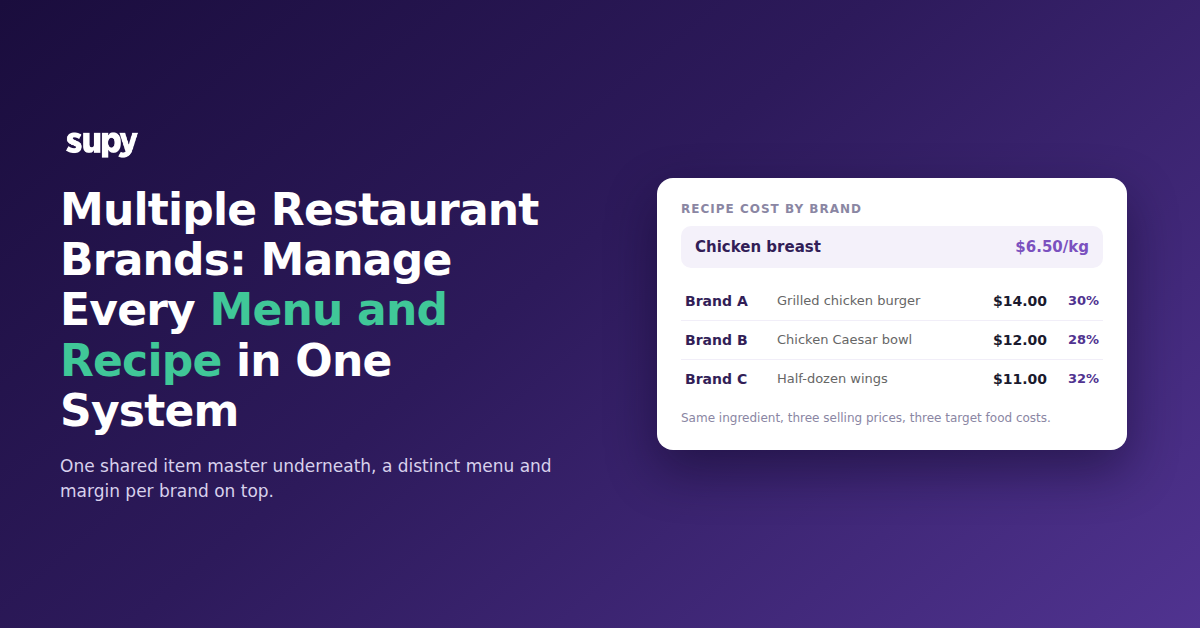
Recipe cost by brand on a shared item master: one chicken breast feeding three brand recipes with different prices and food-cost targets

Run Every Brand From One System, Not One Per Brand

Running each brand as its own system means re-keying the same ingredients, suppliers and reports in every login. A group can manage menus and recipes across multiple brands from one system instead. Share one item master and one procurement setup, then give each brand its own recipes, selling prices and food-cost targets. One set of ingredients, separate menus.

The pain shows up first in the data. When three brands live in three accounts, the same chicken breast is set up three times. A new supplier price has to be entered three times. A group food-cost report becomes three exports stitched together by hand. Every manual step is a place for the brands to drift out of line.

The fix is one instance that separates by brand where it should and shares where it can. Supy's multi-brand inventory structure keeps one base item per ingredient while each brand runs its own menu on top. The table below shows what changes.

What happensSeparate system per brandOne system, shared item master
Ingredient setupKeyed and corrected in each brandOne base item, shared across brands
New supplier priceEntered brand by brandUpdates every brand's recipe cost at once
Group food-cost reportExports merged by handOne view across all brands and branches
Launching a brandMenu rebuilt from scratchRecipes cloned from the library

One Item Master, Different Recipes Per Brand

Keep one base item per ingredient, then let each brand build its own recipe on it. One base item holds every supplier SKU and packaging for that ingredient, so chicken breast at $6.50/kg is set up once and shared across all three brands. Each brand then assigns that ingredient to its own recipes with its own selling price, target food cost and tax rate.

The same chicken runs three margins without a single duplicated recipe. Brand A, a burger brand, sells a grilled chicken burger at $14.00 against a 30% target food cost. Brand B, a salad brand, puts the same chicken in a Caesar bowl at $12.00 against 28%. Brand C, a wings brand, prices a half-dozen wings at $11.00 against 32%. Change the chicken's purchase price once and all three recipe costs move together.
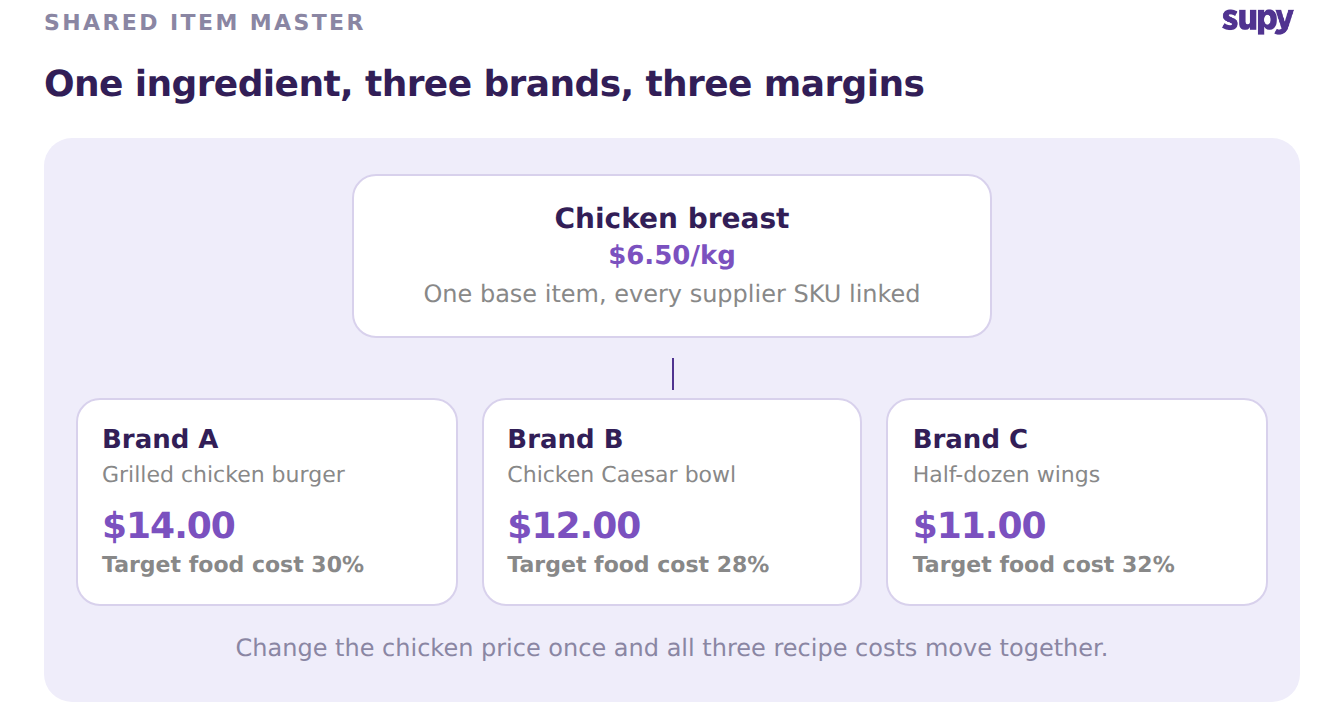
One shared chicken breast base item feeding three brand recipes, each with its own selling price and target food cost

A central recipe library sits above the brands and controls which recipes are available and in production at each site. The brand owns its menu. The group owns the ingredient.

Launching a New Brand: Clone the Library, Then Adjust

Clone from the central recipe library instead of rebuilding a menu from scratch. A nine-branch group adding a third brand does not start with an empty recipe book. Clone the recipes the new brand needs from the library, roughly 42 of them for a mid-size menu, then adjust each selling price and target food cost to the new concept.
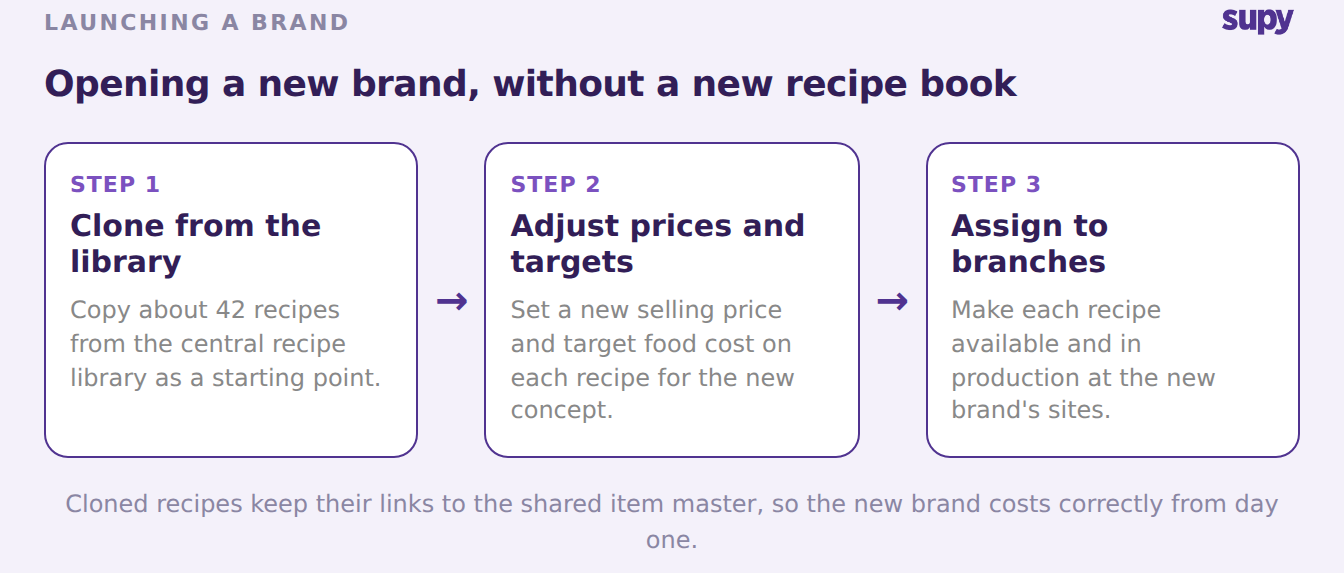
Three steps to launch a new brand: clone recipes from the central library, adjust prices and targets, then assign them to the new brand's branches

The cloned recipes already carry their ingredient links back to the shared item master, so the new brand costs correctly from day one. Assign each recipe to the new brand's branches, set which ones are in production per site, and the menu is live without a second system to maintain. A group that plans a fourth brand repeats the same clone-and-adjust step, not a fresh build.

Keep Each Brand's Food Cost, Margins and Books Apart

Set a target food cost per recipe per location, and the system alerts the brand that owns it when actual cost crosses the line. Targets are scoped to the recipe and the site. Brand C's 34% actual against a 32% target shows up against Brand C, not against the group, where Brand A at 31% and Brand B at 27% would hide it.
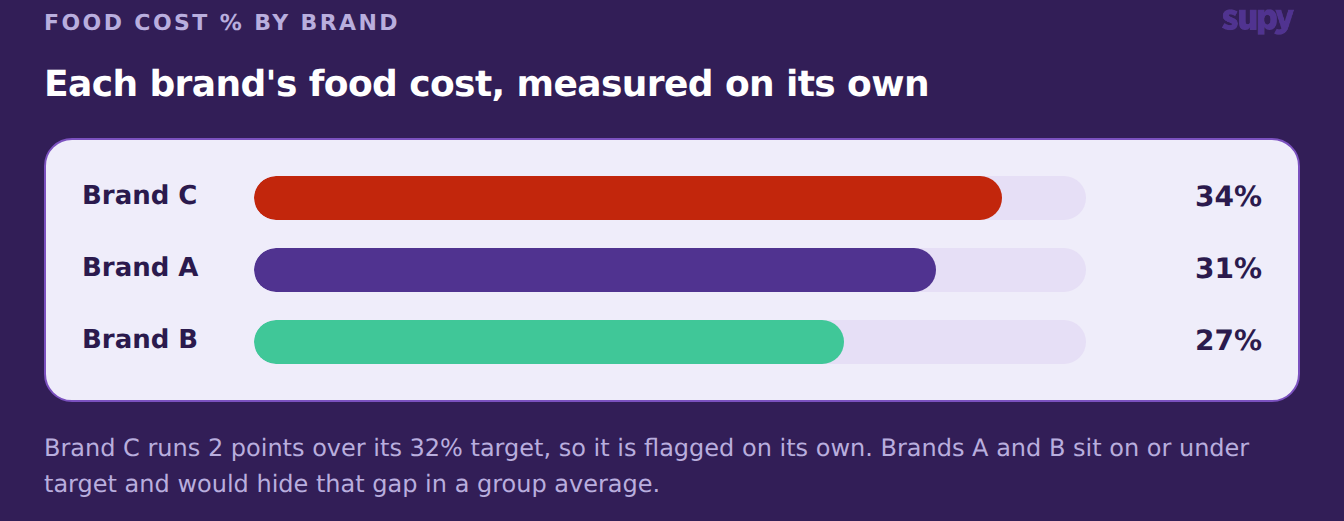
Food cost percentage by brand, with Brand C at 34% over its target while Brands A and B sit on or under target

Dashboards report cost of goods sold and food-cost percentage at group, site and menu level, so each brand's numbers read separately whenever the group wants them. Financials stay scoped the same way. Credit notes and supplier accounts belong to the brand that raised them, so a return on Brand B never lands on Brand A's books. Each brand reads as its own business while the group runs one system.

Which Setup Fits Your Group

Name the situation you are in, then take the one move for it. Most multi-brand groups fall into one of three branches, and the right first step is different for each.

  • Your brands share most ingredients but need different menus. Keep one item master, then build per-brand recipes with their own prices and targets on top. Start by mapping each shared ingredient to a single base item.
  • You are opening or buying a new brand. Clone the recipes you need from the central library, adjust the prices and food-cost targets, and assign them to the new brand's branches.
  • You run a separate login per brand today. Consolidate onto one instance so a supplier price or an ingredient swap lands everywhere at once, then separate the menus back out by brand.
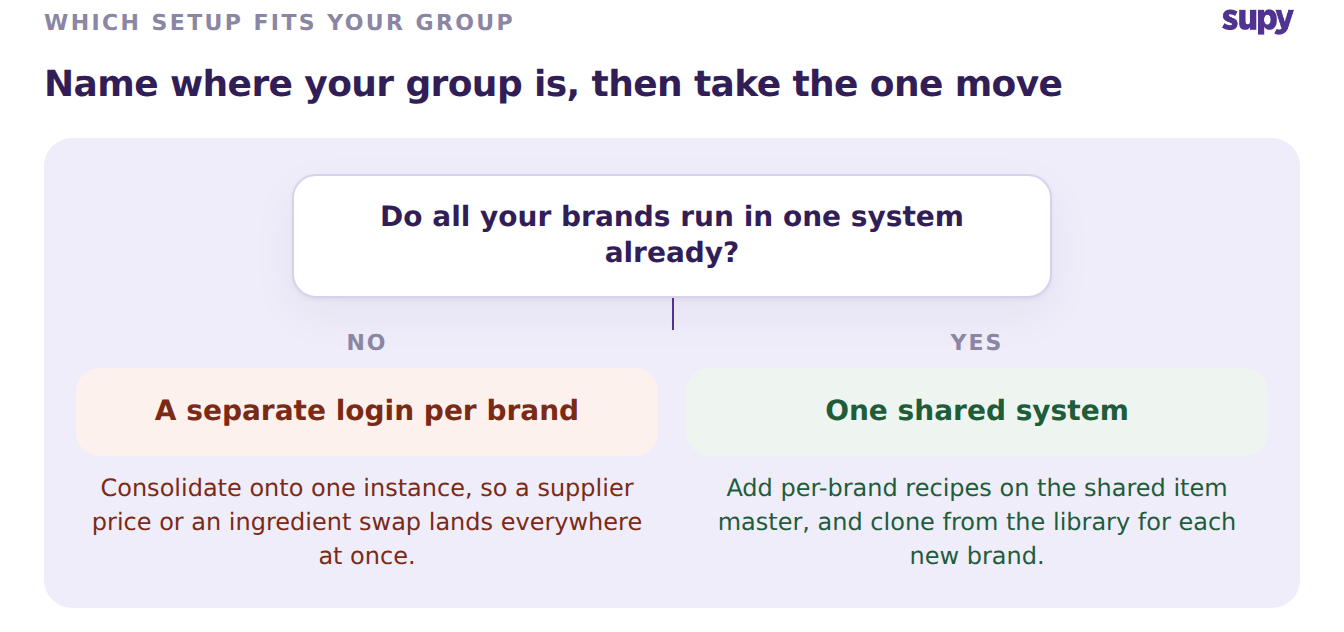
Decision tree for a multi-brand setup: consolidate onto one system if each brand has a separate login, or add per-brand recipes if already on one shared system

Pick the branch that matches your group this quarter and take its first step. One system underneath, a distinct menu and margin on top, is what lets a group add the next brand without adding the next spreadsheet.

Book a Demo with Supy - manage every brand's menus and recipes from one system

Ready to optimize your restaurant operations?

Blog

Our operational insights

No items found.

Your questions 
answered

Everything you need to know about Supy — from setup to integrations, pricing, and daily use. If it’s not covered here, just ask.

Can you manage different menus and recipes for multiple brands in one system?
+

Yes. One system runs several brands when it shares an item master and separates the menus on top. Each brand keeps its own recipes, selling prices and food-cost targets, while every brand draws on the same base items and suppliers underneath. You set up an ingredient such as chicken breast once, and all three brands cost their dishes from it. There is no separate login or database per brand to reconcile. The group manages menus and recipes across every brand from one place, which keeps the brands consistent as the group grows.

How do you share one ingredient across brands but price each brand's dish differently?
+

Hold the ingredient as a single base item, then assign it to a separate recipe in each brand. The base item carries the purchase cost, so chicken breast at $6.50/kg is the same everywhere. Each brand's recipe sets its own selling price and target food cost on top of that shared cost. A burger brand can sell a chicken burger at $14.00 against a 30% target, while a salad brand prices a Caesar bowl at $12.00 against 28%. The ingredient is shared once, and the margins are set per brand.

Do you have to duplicate recipes to run different food-cost targets per brand?
+

No. Duplicating a recipe for each brand is what creates drift, because a change then has to be made in several places. Instead, each brand owns a recipe that links back to the shared base items. A target food cost is set on the recipe itself, per location, so two brands using the same ingredient can hold different targets without any copy. When the ingredient price moves, every brand's recipe cost updates from the one base item. You maintain one ingredient and one recipe per brand, not a copy per brand.

How do you launch a new brand's menu without rebuilding every recipe?
+

Clone the recipes the new brand needs from the central recipe library, then adjust them. A new brand rarely starts from nothing, so you copy a set of existing recipes, roughly 42 for a mid-size menu, as a starting point. Each cloned recipe keeps its links to the shared item master, so it costs correctly straight away. You then change the selling price and target food cost to suit the new concept, and assign the recipes to the new brand's branches. The menu goes live without a second system to set up and maintain.

Can each brand have its own food-cost targets and alerts?
+

Yes. A target food cost is set per recipe per location, and the brand that owns the recipe is alerted when its actual cost crosses the target. Because the target sits on the recipe rather than on the group, each brand is measured against its own number. One brand running 34% against a 32% target shows up on its own, instead of being averaged away by other brands sitting under target. Dashboards then report cost of goods sold and food-cost percentage at group, site and brand level, so you read each brand separately.

How do you keep each brand's credit notes and accounts separate?
+

Scope the financials to the brand that raised them. A credit note or a supplier account belongs to the brand it came from, so a return on one brand never lands on another brand's books. The brands still share one item master and one set of suppliers underneath, which keeps procurement consistent. The money, though, stays separated by brand, so each concept reads as its own business when you close the period. You get shared buying power without mixing the brands' financial records.

Is one system for every brand better than a separate account per brand?
+

One system is better when the brands share ingredients and suppliers, which most multi-brand groups do. A separate account per brand means setting up the same ingredient several times, entering each supplier price several times, and merging group reports by hand. One system with a shared item master removes that repeated work and the drift it causes. The brands still keep distinct menus, prices and targets on top. You would split into separate systems only when two brands share almost nothing, which is rare inside a single group.

Ready to transform your operations?

Join 3500+ restaurant operators cutting costs, streamlining operations and making smarter decisions with Supy.