.jpeg)


POS-Modifikatoren im Restaurant: Ein Rezept für alle Standorte
Wo beginnen: Welches Modifikatorproblem lösen Sie?
Die Zuordnung eines POS-Modifikators zum richtigen Rezept scheitert in dem Moment, in dem Sie dies namenbasiert über mehrere Standorte hinweg tun. Derselbe Modifikatorname kann je nach Gericht, zu dem er hinzugefügt wird, ein anderes Rezept erfordern. Die dahinterstehenden Codes stimmen von einer Filiale zur nächsten selten überein. Ordnen Sie stattdessen nach POS-Artikelcode zu und standardisieren Sie diese Codes, bevor Sie skalieren.
Diese eine Änderung – die Zuordnung nach Code statt nach Name – ist die Entscheidung, von der alles andere abhängt. Die drei nachfolgenden Situationen sind diejenigen, auf die eine Multi-Standort-Gruppe tatsächlich trifft. Sie erscheinen in der Reihenfolge, in der sie normalerweise auftreten. Finden Sie diejenige, die Ihrer Einrichtung entspricht, und gehen Sie direkt zur entsprechenden Lösung.
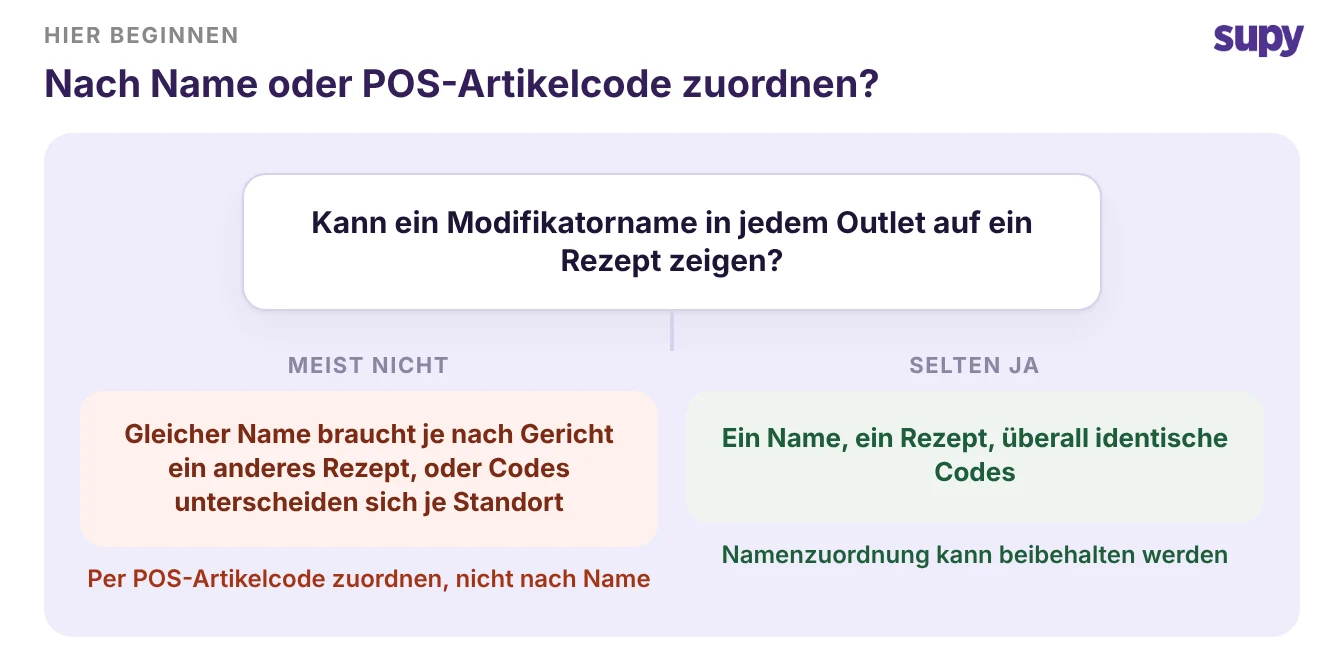
Wenn derselbe Modifikator ein anderes Rezept benötigt
Ein einzelner Modifikatorname ist kein einzelnes Rezept. „Hafermilch" bei einem Flat White ist ein kleiner Barista-Anteil. „Hafermilch" in einer Porridgeschüssel ist eine größere, in der Küche zubereitete Menge.
Ordnen Sie diese eins zu eins nach Name zu und jeder Verkauf reduziert die falsche Menge. Ihr theoretischer Verbrauch weicht vom ersten Tag an von der Realität ab.
Die zuverlässige Einheit ist der POS-Artikelcode, nicht das Etikett, das der Gast sieht. Vergeben Sie für jede Kombination aus übergeordnetem Artikel und Modifikator einen eigenen Code. Ordnen Sie diesen Code dann dem entsprechenden Rezept zu.
Supy verknüpft einen POS-Artikelcode – einschließlich Artikel auf Modifikatorebene – mit dem entsprechenden Rezept. Jeder Verkauf dieses genauen Artikels reduziert dann die richtigen Zutatmengen. Alles, was Sie noch nicht zugeordnet haben, erscheint nach jeder Synchronisierung auf einem Überprüfungsbildschirm. Ein fehlender Modifikator erscheint dort, anstatt still nichts zu reduzieren.
Die Zuordnung nach Code korrigiert auch die Bestandsmathematik, die die Namenszuordnung falsch macht. Wenn der Flat White verkauft wird, wird der 90-ml-Barista-Anteil vom Bestand abgezogen. Wenn die Porridgeschüssel verkauft wird, wird stattdessen die größere Küchenmenge abgezogen, da jeder Code auf sein eigenes Rezept verweist. Der theoretische Verbrauch verfolgt dann, was die Küche tatsächlich serviert hat, sodass die Abweichung gegenüber der Inventur den realen Verbrauch widerspiegelt und keinen Zuordnungsfehler, den man Wochen später aufdeckt.
| Übergeordneter Artikel | Modifikator | POS-Artikelcode | Supy-Rezept |
|---|---|---|---|
| Flat White | Hafermilch | LAT-OAT | Hafermilch 90 ml |
| Porridgeschüssel | Hafermilch | POR-OAT | Hafermilch 220 ml |
| Iced Latte | Hafermilch | ICE-OAT | Hafermilch 120 ml |
| Pfannkuchen | Extra-Sirup | PAN-SYR | Ahornsirup 30 ml |
Wenn sich die Codes in jeder Filiale unterscheiden
Hier stocken die meisten Gruppen. Sie schließen die Zuordnung in einer Filiale ab und wechseln zur nächsten. Die Modifikatorcodes sind anders, sodass keine der Arbeit übernommen wird.
Sie machen es manuell in jeder Filiale erneut. Das gilt selbst dann, wenn 80 bis 90 Prozent der Speisekarte standortübergreifend identisch ist. Es hört auf zu skalieren, sobald Sie einen Standort hinzufügen.
Es gibt keinen Ein-Klick-Kopiervorgang, der eine Zuordnung zwischen Filialen überträgt. Danach zu suchen ist das falsche Ziel. Standardisieren Sie zuerst die Modifikatorcodes.
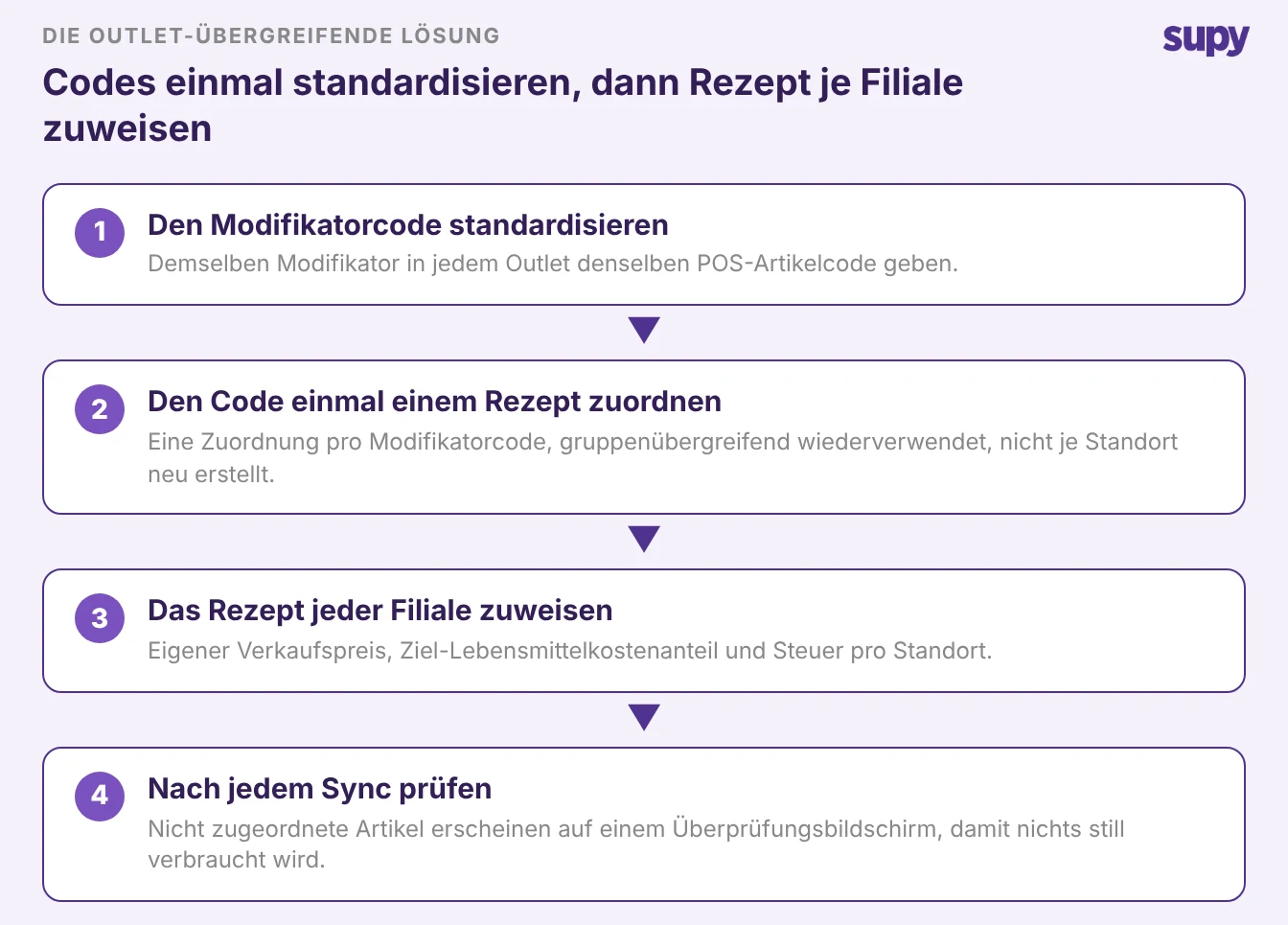
Vergeben Sie demselben Modifikator überall denselben POS-Artikelcode. Ordnen Sie jeden Code einmal seinem Rezept zu. Weisen Sie dieses Rezept dann jeder Filiale zu – mit eigenem Verkaufspreis, Wareneinsatzziel und Steuer.
Die geplante POS-Synchronisierung hält die Verkäufe pro Filiale im Fluss. Der Überprüfungsbildschirm erfasst alles, was noch nicht zugeordnet ist. Rezeptkosten bleiben an jedem Standort aktuell, nicht nur an dem, den Sie zuerst eingerichtet haben.
Die Zuweisung pro Filiale ist das, was die Marge ehrlich hält, wenn Sie wachsen. Jede Filiale trägt ihren eigenen Verkaufspreis, ihr eigenes Wareneinsatzziel in Prozent und ihre eigene Steuer für dasselbe Rezept, sodass eine Zuordnung Filialen bedient, die das Gericht unterschiedlich bepreisen. Die Synchronisierung läuft nach einem Zeitplan, der an jede Filiale gebunden ist und während der Ausführung sperrt, sodass zwei Synchronisierungen nicht gleichzeitig ausgeführt werden und einen Verkauf doppelt zählen können.
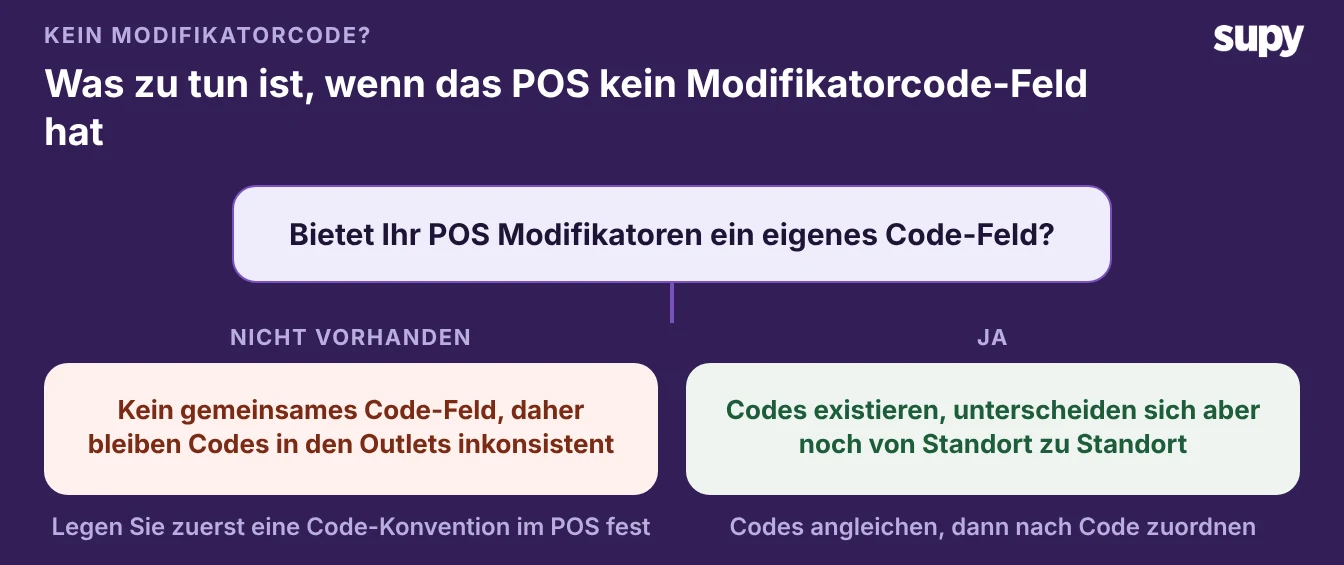
Wenn Ihr POS keinen gemeinsamen Modifikatorcode hat
Manche POS-Systeme geben Modifikatoren überhaupt kein eigenes Codefeld. Die Codes bleiben dann filialübergreifend inkonsistent, und Sie können sie nicht per Kopieren-Einfügen angleichen. Dies ist die Situation, die die manuelle Arbeit erzwingt, die andere Filialen vermeiden lassen. Beheben Sie das im POS, bevor eine Zuordnung zuverlässig ist.
Einigen Sie sich auf eine Code-Konvention und wenden Sie sie überall an. Legen Sie fest, wie ein Modifikator codiert wird: übergeordneter Artikel plus Modifikator. Verwenden Sie genau dieses Muster in jeder Filiale, wenn Sie die Speisekarte im POS aufbauen.
Sobald die Codes konsistent sind, funktioniert die Zuordnung nach Code wie bei jeder anderen Gruppe. Der Überprüfungsbildschirm zeigt Ihnen dann, welche Artikel noch Aufmerksamkeit benötigen.
Wählen Sie die Variante, die zu Ihrer Gruppe passt. Wenn derselbe Modifikatorname unterschiedliche Rezepte erfordert, ordnen Sie nach dem POS-Artikelcode zu, nicht nach dem Etikett. Wenn sich die Codes je Filiale unterscheiden, standardisieren Sie diese zuerst und lassen Sie den Überprüfungsbildschirm die Lücken finden.
Wenn Ihr POS kein Modifikator-Codefeld hat, einigen Sie sich auf eine Konvention und führen Sie diese ein, bevor Sie skalieren. Ein Rezept, nach Code zugeordnet und pro Filiale zugewiesen, sorgt dafür, dass jeder Verkauf die richtigen Zutaten reduziert. So bleibt die Marge jeder Filiale ehrlich.