.jpeg)


برنامج إدارة مخزون الخدمة الغذائية: ما يحتاجه فعلًا مشغّلو المواقع المتعددة

ما الذي يجب أن يوفره برنامج إدارة مخزون الخدمة الغذائية لتحقيق القيمة
يتتبع برنامج إدارة مخزون الخدمة الغذائية المخزون الذي تحتفظ به منشأة الضيافة وقيمته وكيفية تحركه، عبر جميع المواقع وفي الوقت الفعلي تقريبًا. في موقع واحد، يستطيع جدول البيانات تغطية معظم ذلك. أما عبر مواقع متعددة فلا: فور إدارة أكثر من مطبخ واحد، يجب أن يحتفظ البرنامج بصورة دقيقة واحدة يُحدّثها كل فرع ويثق بها الجميع.
تُختزل معظم أدلة المشترين في هذه الفئة إلى قائمة تحقق بالميزات: مسح الباركود، والتنبيهات عند انخفاض المخزون، وتطبيق عدّ للهاتف المحمول. هذه متطلبات أساسية يُلبّيها تقريبًا كل منتج في قائمتك القصيرة، وهي ليست ما يُميّز أداةً تصلح لمجموعة عن أداةٍ صُممت لمطعم واحد فحسب. الاختبار الحقيقي هو طبقة الحوكمة التي لا تظهر إلا حين تتوزع المخزونات والعدّات والطلبات عبر المواقع، وعند هذا الحد يخفق معظم برامج إدارة المخزون للمطاعم بهدوء.
الإمكانات الخمس التالية هي الأجدر بالترجيح الكبير عند التقييم. إذا كان المنتج ضعيفًا فيها، فلا أهمية لمدى أناقة شاشة العد.
خمس إمكانات لا تهم إلا حين تدير أكثر من موقع واحد
| ما المطلوب | لماذا يهم على نطاق واسع |
|---|---|
| مخزون مباشر عبر كل موقع | القرارات تستند إلى بيانات راهنة لا تصدير الأمس |
| التباين بين النظري والفعلي قابل للتحقيق | أغلق الفجوة، لا تكتفِ بطباعة التقارير |
| ملكية المنافذ للمنتجات المشتركة في المخزون | المساءلة حين تختلط المنتجات في متجر واحد |
| المستوى الاسمي مرن حسب اليوم | الطلبات تتطابق مع الطلب الحقيقي لا رقم ثابت |
| الفاتورة وإشعار الاستلام يصلان إلى المحاسبة | يُزيل العمل الإداري بدلًا من إضافة إعادة الإدخال |
لماذا تتفوق صورة المخزون المباشرة على جدول البيانات الذي تثق به لساعة واحدة
رقم المخزون مفيد فقط طالما لا يزال صحيحًا. العدّ المُصدَّر إلى جدول بيانات دقيق في اللحظة التي ينتج فيها ويبتعد عن الدقة منذ تلك اللحظة، مع استهلاك العناصر ونقلها واستلامها. حين يفتح المدير الإقليمي الجدول، تُتخذ القرارات استنادًا إلى رقم تحرّك بالفعل.
الإمكانية المطلوبة هي صورة مباشرة لا لقطة آنية: كميات المخزون المتاح وقيمته وتاريخ حركته، مرئية عبر كل موقع دون الحاجة إلى تصدير أي شيء. تُظهر Supy المخزون عبر ست عروض مباشرة وتُنبّه بالعناصر التي تنخفض دون الحد الأدنى أو ترتفع فوق المستوى الاسمي، فتظل الصورة راهنة حين تطّلع عليها لا راهنةً وفق آخر وقت أتاح فيه الفرع تحديث جدول بيانات.

حين يتوقف التوافق بين المخزون النظري والفعلي عبر مواقعك
المخزون النظري هو ما يُخبرك به النظام بأنه يجب أن يكون لديك، استنادًا إلى ما اشتريته مطروحًا منه ما تقول وصفاتك أنك بعته. المخزون الفعلي هو ما تجده عملية العد المادي على الرف. الفجوة بين الاثنين هي التباين، وعلى نطاق واسع هو الرقم الأكثر كشفًا في كامل المنظومة.
الإبلاغ عن الفجوة أمر سهل. التحقيق فيها هو الجزء الأصعب، وهو ما ينبغي اختبار المنتج عليه. تُشغّل إحدى المجموعات متعددة المواقع عمليات عدّ يومية وأسبوعية وشهرية مع خطط عمل منظّمة لإبقاء هذه الفجوة مغلقة، لأن التباين الذي لا يمكن التعمق فيه مجرد إنذار بلا مفتاح إيقاف. يجب أن يتيح البرنامج رؤية التباين حسب العنصر وحسب الموقع وعبر الزمن، وتتبّعه وصولًا إلى خطأ في العد أو تعيين وصفة خاطئ أو خسارة فعلية. ولمن يريد التعمق في آليات تباعد الرقمين، نتناول ذلك بالتفصيل في تكلفة الغذاء النظرية مقابل الفعلية.
أين يتوقف التوافق بين النظري والفعلي
| العنصر | النظري | الفعلي | التباين |
|---|---|---|---|
| Chicken Breast | 42 kg | 38 kg | -4 kg / -$34 |
| Mozzarella | 25 kg | 22 kg | -3 kg / -$41 |
| Olive Oil 5L | 18 | 17 | -1 / -$29 |
| Tomato Passata | 60 | 57 | -3 / -$11 |
| الفجوة الإجمالية | -$115 |
من يملك المخزون في مستودع مركزي مشترك
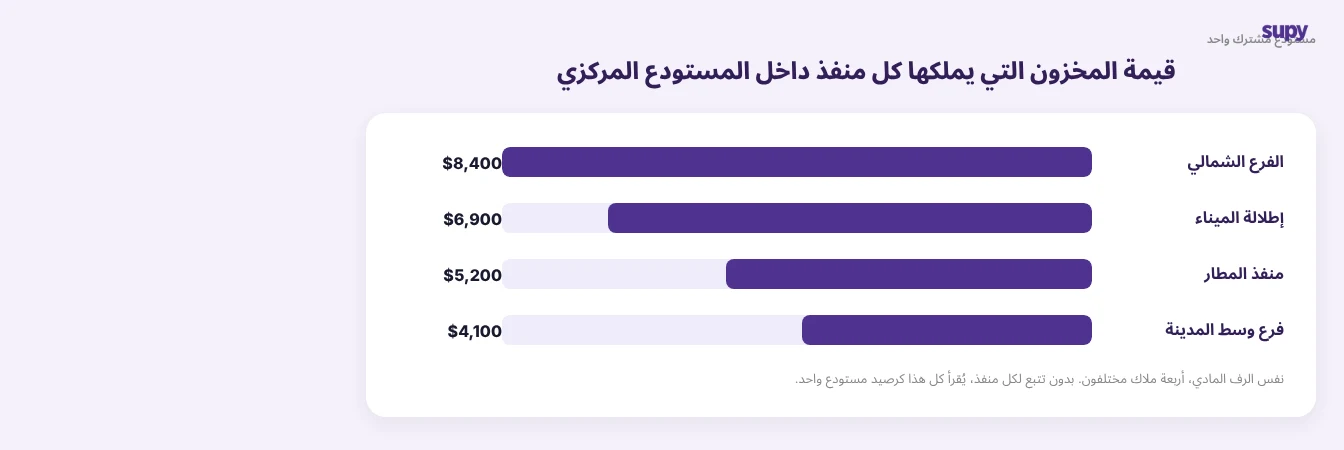
تصطدم المجموعات التي تدير المطبخ المركزي أو مستودعًا مشتركًا بمشكلة لا تحتاج الأدوات ذات الموقع الواحد إلى حلها قط: حين تحتفظ منافذ متعددة بالمخزون في مكان مادي واحد، من يملك أي حصة منه. يصف المشغّلون عجزهم عن تتبع ملكية المخزون بعد اختلاط المخزونات، وبدون هذا التتبع لا يكون أي فرع مسؤولًا عن هدره الخاص أو أمواله المُقيَّدة الخاصة.
اسأل أي منتج تقيّمه عن كيفية تعامله مع هذا. المخزون الجالس على رف واحد قد يكون ملكًا لأربعة منافذ مختلفة، ويجب أن يقرأه البرنامج بهذه الطريقة لا كرصيد مستودع واحد لا يملكه أحد. هذا متطلب متعدد المواقع حقيقي لا رفاهية، ويستحق الاطلاع على تطبيقه عمليًا في ملاحظتنا حول ملكية مخزون المنفذ في مستودع مشترك.
لماذا تُخطئ المستويات الاسمية الثابتة حين يتحرك الطلب يومًا بيوم
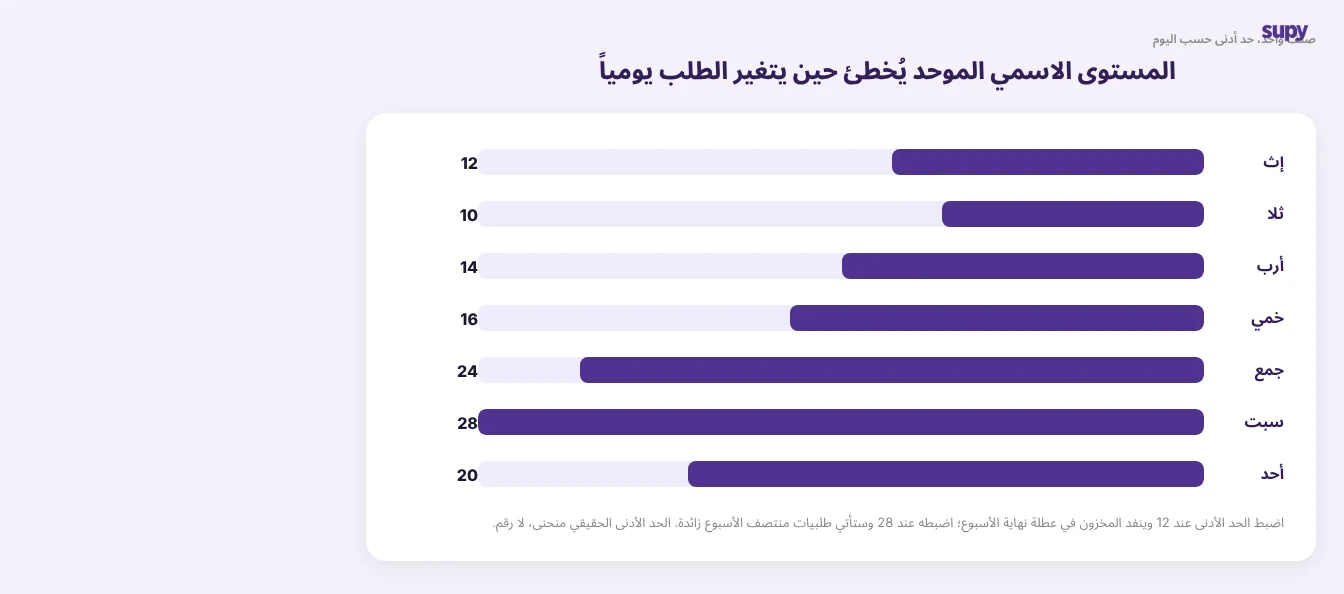
المستوى الاسمي هو حجم العنصر الذي تريد توافره قبل إعادة الطلب. تتعامل الأدوات البسيطة معه كرقم ثابت واحد لكل عنصر. العمليات الحقيقية لا تسير بهذه الطريقة. يُشغّل أحد المشغّلين عملية تقديم طلبات يومية حيث تتغير المستويات الاسمية حسب يوم الأسبوع، ثم يُعيد توزيع الإنتاج الفائض بين المطابخ فورًا. مستوى اسمي ثابت وحيد محسوب على أساس متوسط الأيام يُفرز نقصًا في موقع مشغول كل عطلة نهاية أسبوع ويترك موقعًا هادئًا زائد الطلبات في منتصف الأسبوع.
إذا كنت تُفضّل عدم حساب المستوى الاسمي يدويًا، فإن حاسبة المستوى الاسمي المجانية تحسبه لكل عنصر في جدولك استنادًا إلى استخدامك وأيام التوصيل ومهل التوريد لديك.
لذا السؤال الذي يجب طرحه على المورّد ليس ما إذا كان يدعم المستويات الاسمية، بل ما إذا كانت هذه المستويات قابلة للمرونة: حسب اليوم وحسب الموقع وبالنسبة للطلب الفعلي لا التخمين الثابت. إذا كانت الإجابة رقمًا واحدًا لكل عنصر، فستتعارض الأداة مع عملية الطلب لديك بدلًا من دعمها.
سؤال التكاملات الذي يُحدد ما إذا كان البرنامج يُضيف العمل الإداري أم يُزيله
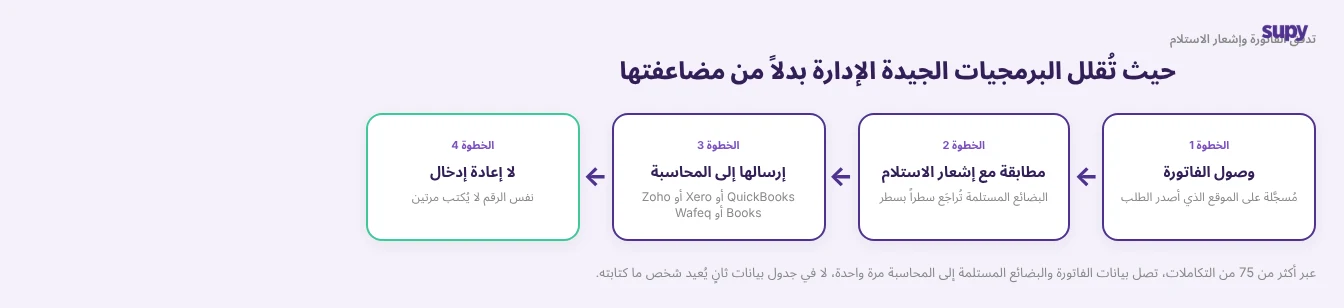
أسرع طريقة لمعرفة ما إذا كان برنامج إدارة المخزون سيوفر الوقت أم سيُكلّفه هي متابعة فاتورة مورّد واحدة. في نظام متكامل جيدًا، تُسجَّل الفاتورة في مقابل الموقع الذي أصدر الطلب، وتُطابَق مع إشعار استلام البضاعة (GRN، سجل ما وصل فعليًا)، وتُرسَل مباشرة إلى نظام المحاسبة. لا يُعاد إدخال الأرقام من أحد. تتصل Supy بـ QuickBooks وXero وZoho Books وWafeq و75+ منصة أخرى تحديدًا لهذا الغرض.
في نظام ضعيف التكاملات، تُكتب الأرقام ذاتها مرتين: مرة في أداة المخزون وأخرى في المحاسبة، في كل موقع وكل أسبوع. هذا ليس عبئًا بسيطًا. إنه الفرق بين برنامج يُزيل العمل الإداري وبرنامج يُضاعفه بهدوء، ولهذا تستحق التكاملات قدرًا مساويًا لأي ميزة عدّ في قرارك.
تحويل هذا إلى قرار شراء أمر بسيط بمجرد معرفة ما تبحث عنه. في العرض التوضيحي، شغّل عملياتك الخاصة عبر الأداة بدلًا من مشاهدة الجولة المُعدّة مسبقًا: اطلب رؤية المخزون المباشر عبر موقعين في آنٍ واحد، واسأل كيف يُظهر التباين الذي يمكنك التحقيق فيه لا مجرد التقارير، واطلب منه نمذجة المستويات الاسمية التي تتغير حسب اليوم، وتابع فاتورة واحدة طوال طريقها إلى نظام محاسبتك. منتج يتعامل مع هذه الجوانب الأربعة بسلاسة سيتعامل مع الباقي. من يتعثر فيها سيواصل التعثر بعد توقيعك.
صُممت Supy لمشغّلي الأغذية والمشروبات متعددي المواقع، فهذه هي المهام التي صُممت لتؤديها: مخزون مباشر عبر كل موقع، والتباين بين النظري والفعلي الذي يمكنك التعمق فيه، وملكية منفذ مستقل للمخزون المختلط، وبيانات الفواتير والبضائع المستلمة التي تتدفق إلى المحاسبة دون إعادة إدخال. إذا كانت هذه قائمتك القصيرة، فيستحق الأمر رؤيتها مقابل أرقامك الخاصة.