.jpg)


POS and Restaurant Manager Software: Why One Search Hides Two Different Systems
What "POS Restaurant Manager" Software Actually Refers To
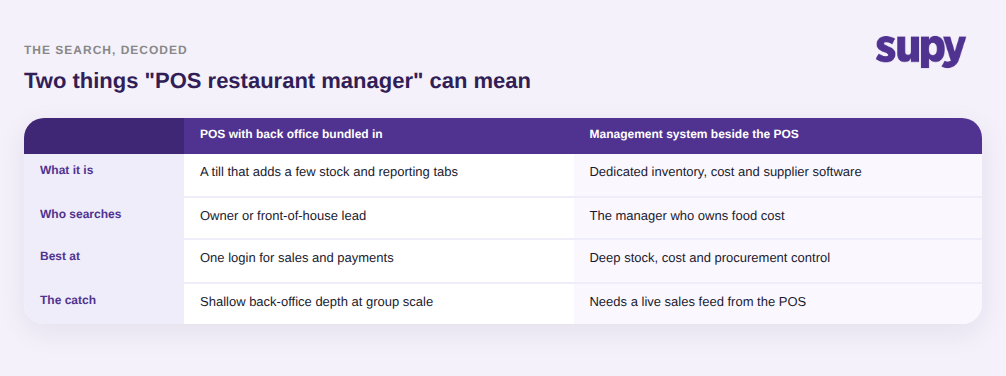
A "POS restaurant manager" search resolves to one of two things: a point-of-sale product that bundles some back-office management on top of the till, or a dedicated management system a restaurant manager runs alongside the POS to handle inventory, procurement, recipe cost, and reporting. The POS records what was sold at the counter. The management layer explains what that selling did to your stock, your margin, and your next order.
The distinction matters because the two are priced, sold, and adopted differently. A bundled POS suite is bought by whoever owns the front of house and the payment terminal. A dedicated management system is bought by whoever owns food cost and supply. In a single-site cafe those can be the same person, so the bundle looks tidy. Across a group they rarely are, and the "manager" in the search is usually asking which system solves the problem sitting on their desk right now, not which brand of till to install.
Where the POS Ends and the Management System Begins
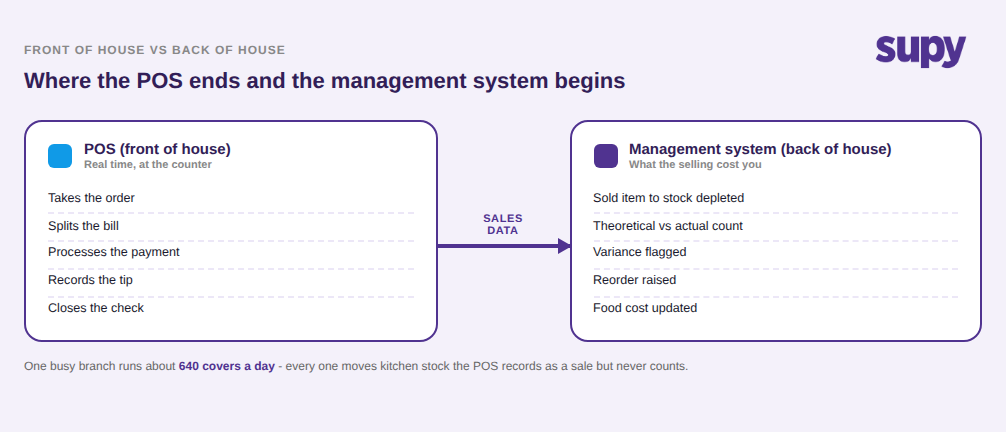
The clean way to think about it is front of house versus back of house. The POS owns the transaction: it takes the order, splits the bill, processes the payment, records the tip, and closes the check. Everything it is excellent at happens at or near the counter, in real time, in front of a guest.
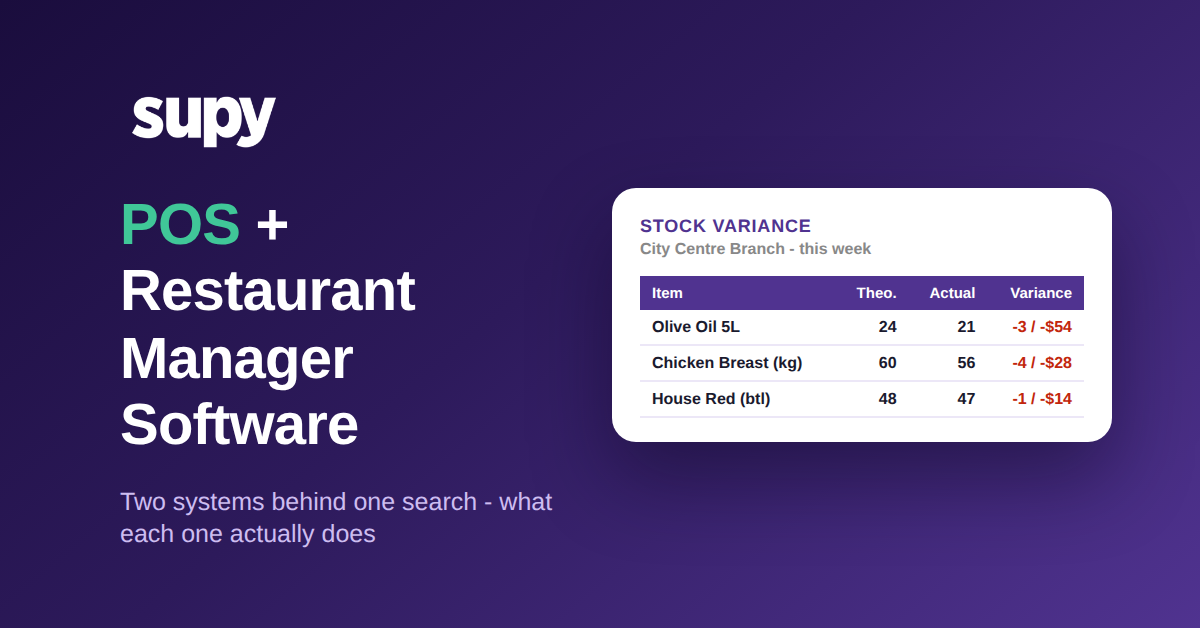
The management system owns everything that happens because of those transactions but not at the counter. When a burger sells, the POS logs the sale; the management layer is what turns that sold burger into 150 grams of beef, one bun, and a slice of cheese leaving stock, then compares that theoretical depletion against a physical count, flags the variance, and rolls it into a reorder and a food-cost number. The POS knows what left the till. The management system knows what left the kitchen, and what it cost you. A group that treats the POS as its stock and cost system is really running on sales data alone, with the whole back-of-house half of the picture missing.
How Sales Data Bridges the Two, and Why That Bridge Is Not Automatic
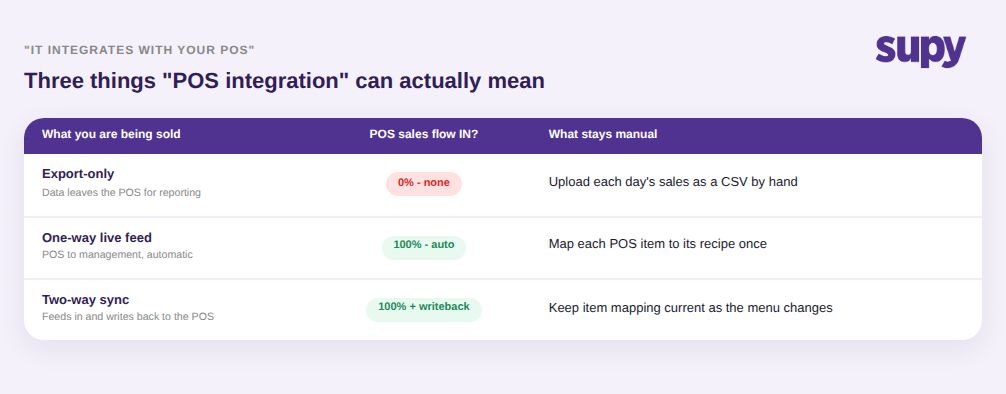
The two layers connect through one thing: sales data flowing from the POS into the management system, where each sold item is converted into the stock it consumed. That single feed is the bridge, and "it integrates with your POS" can quietly mean three very different bridges. An export-only connection sends data out of the POS for reporting but pulls nothing back in, so your management system still gets its sales by manual upload. A one-way live feed pushes completed sales into the management system automatically. A two-way sync does that and writes information back to the POS as well. Before you assume the two systems talk, confirm which of the three you are actually being sold, because the word "integration" covers all of them.
Even a live feed is not the end of the work. Every item on the POS has to be mapped to the recipe and stock item it represents in the management system, and anything left unmapped simply does not deplete, which quietly under-reports how much stock and revenue moved. A menu that is only partly mapped produces numbers that look precise and are wrong. And some POS platforms, especially niche or regional ones, offer no usable integration at all, which for many groups is the single biggest thing standing between them and an accurate back office. If you want the mechanics of that feed and where it breaks, our guide to restaurant inventory software integrations goes deeper than we can here.
When You Are the Manager, Match the Tool to the Job
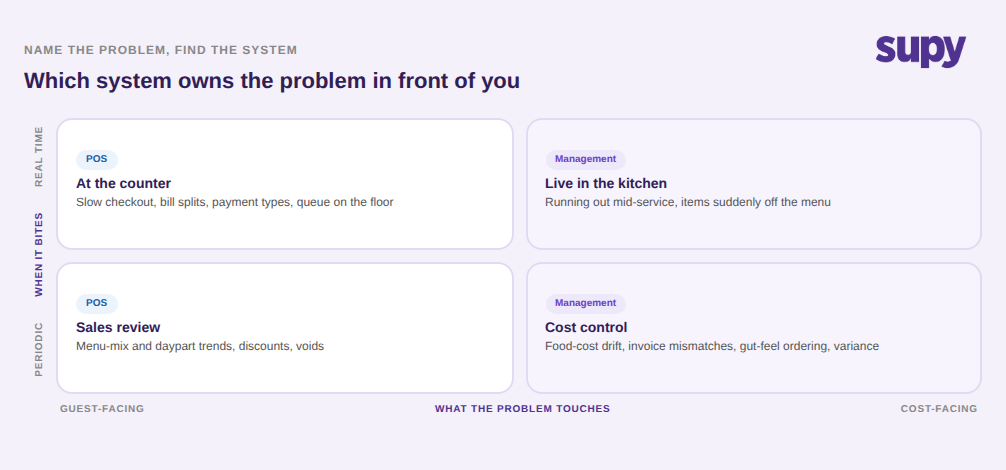
If you are the person doing the searching, the fastest way out of the ambiguity is to name the problem you are trying to fix and see which layer owns it. Slow service at the counter, bill splitting, payment types, and floor throughput are POS problems, and no amount of inventory software fixes them. Stock running out mid-service, a food-cost percentage that drifts, invoices that do not match what arrived, and orders placed on gut feel are management-layer problems, and a better till will not touch them.
Most groups end up needing both, because the two solve genuinely different jobs. What they should not do is buy one expecting it to be the other. A POS bought in the hope it will also control food cost leaves the back office running on spreadsheets; a management system bought without checking it can actually ingest your POS's sales leaves you typing numbers in by hand. The search phrase blurs the two together, but the buying decision has to keep them apart.
Before you shortlist anything, settle the search with four questions. First, which problem is actually costing you money right now, a front-of-house one or a back-of-house one? That tells you which layer to lead with. Second, if it is a back-office problem, does the management system you are considering ingest your specific POS as a live feed, not export-only? Third, will your POS vendor actually give up the sales data, since some will not? Fourth, who owns the mapping of POS items to stock, and how much of the menu has to be mapped before the numbers can be trusted? Answer those and the two-systems-behind-one-search problem stops being a source of confusion and becomes a clear, ordered decision.
Supy is the back-of-house management layer that sits on top of your POS, turning sales into live stock, cost, and supplier control across every location. See how it handles sales and POS integrations, or book a demo to walk through it with your own menu.