.jpeg)


Dauerbestellungen für Restaurants: Wiederkehrende Lieferantenbestellungen über mehrere Standorte automatisieren
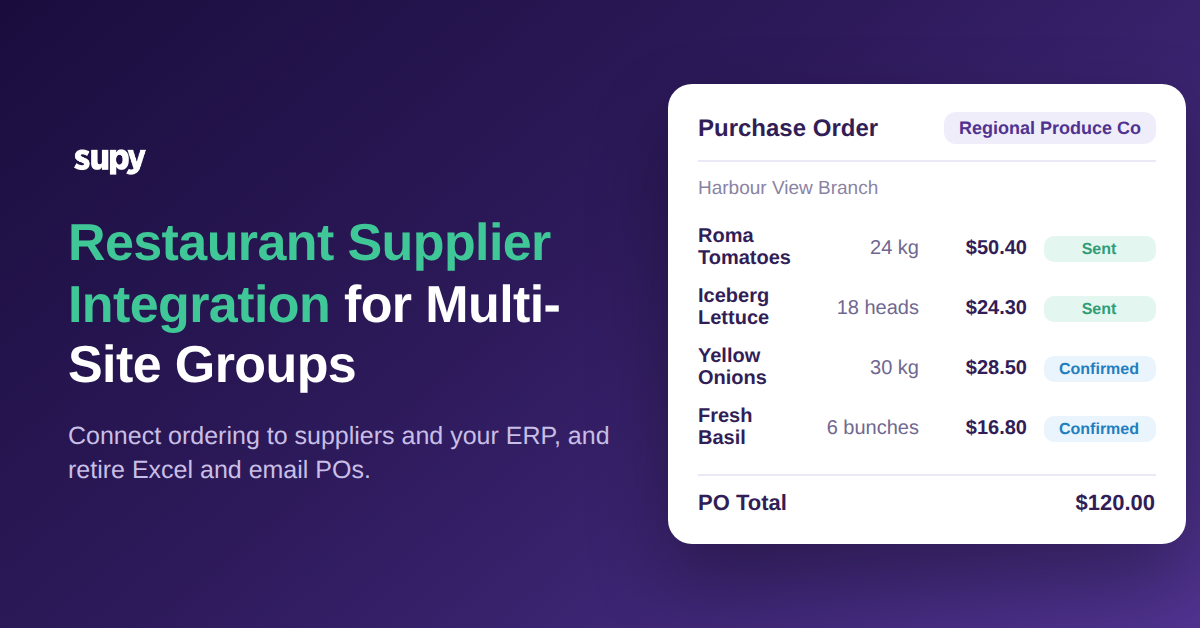
Die meisten Ihrer Lieferantenbestellungen nächste Woche werden fast genauso aussehen wie diese Woche. Dieselben Proteine, dieselbe Milchwirtschaft, dieselben Trockenwaren, in ungefähr denselben Mengen, an dieselben Lieferanten. Dennoch öffnet in vielen Gruppen mit mehreren Standorten ein Einkäufer noch immer jeden Zyklus einen leeren Bestellbildschirm und gibt alles manuell neu ein – für jeden Standort. Dauerbestellungen beseitigen diesen Schritt. Sie definieren die wiederkehrende Bestellung einmal als Vorlage, legen den gewünschten Rhythmus fest, und das System erstellt und sendet die Bestellung planmäßig an den Lieferanten, ohne dass jemand von vorne beginnen muss.
Dies ist ein praktischer Leitfaden zur Durchführung von Dauerbestellungen für Restaurants über mehrere Standorte hinweg: wie eine wiederkehrende Vorlage erstellt wird, wie jede Filiale ihr eigenes Lieferantenkonto behält, wie der Bedarf aller Outlets in einer Bestellung zusammengeführt wird und wie die Bestellung tatsächlich beim Lieferanten ankommt. Der Nutzen ist real. Eine Gruppe mit 12 Standorten, die rund 40 wiederkehrende Lieferantenbestellungen pro Woche manuell neu eingibt, kann diese Arbeit an einen Zeitplan übergeben und sich dabei etwa 6 Stunden pro Woche zurückholen – und gleichzeitig die Eingabefehler reduzieren, die mit dem wiederholten Eintippen derselben Bestellung entstehen.
Was eine Dauerbestellung ist – und warum sie keine KI-Prognose ist
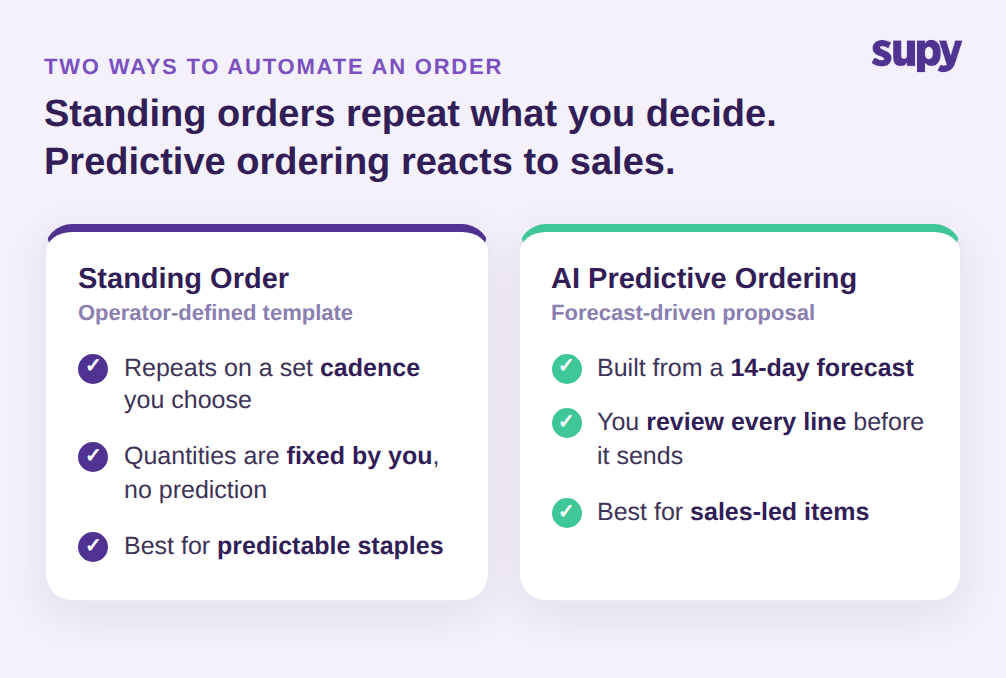
Eine Dauerbestellung ist eine vom Betreiber definierte, wiederkehrende Bestellvorlage. Sie entscheiden über Lieferant, Artikel, Mengen und Zeitplan, und diese Vorlage wiederholt sich selbstständig, bis Sie sie ändern. In Supy ist dies eine aktive Funktion: geplante wiederkehrende Bestellungen, die auf Vorlagen basieren und wöchentlich, monatlich oder alle X Tage ausgeführt werden. Sie behalten die Kontrolle über die Zahlen; das System verhindert lediglich, dass Sie sie erneut eintippen.
Das ist ein anderer Mechanismus als prognosegesteuertes Bestellen – und der Unterschied ist wichtig, wenn Sie entscheiden, wie Sie automatisieren möchten. Die Vorausschauende Bestellungs-KI erstellt eine vorgeschlagene Bestellung aus einer Umsatzprognose, die durch Ihre Rezepte läuft und den aktuellen Bestand abzieht, und bittet Sie, jede Zeile vor dem Versand zu überprüfen. Sie wird von einer 14-Tage-Umsatzprognose gespeist und ist ideal für Artikel, deren Nachfrage mit dem Umsatz schwankt. Eine Dauerbestellung macht überhaupt keine Prognose. Sie ist das richtige Werkzeug für die Grundprodukte, von denen Sie wissen, dass Sie sie in einem festen Rhythmus benötigen: die Brotlieferung jeden Montag, das Reinigungsmaterial jeden Monat, die Frischwarenbestellung dreimal pro Woche.
Der Grund, warum die Unterscheidung wichtig ist: Beide Ansätze scheitern auf entgegengesetzte Weisen, wenn man den falschen wählt. Legen Sie einen wirklich variablen, umsatzabhängigen Artikel in eine feste Dauerbestellung, bestellen Sie in einer ruhigen Woche zu viel und haben in einer belebten zu wenig – weil die Vorlage die Nachfrage nicht sieht. Legen Sie ein gleichbleibend stabiles Grundprodukt durch eine Prognose, fügen Sie einem Auftrag Überprüfungsarbeit hinzu, der nie eine Entscheidung brauchte. Die Sortierregel ist daher einfach: Wenn die Menge davon abhängt, wie viel Sie zu verkaufen erwarten, prognostizieren Sie sie; wenn die Menge eine Gewohnheit ist, der Sie bereits vertrauen, erstellen Sie eine Vorlage. Wenn Sie stattdessen den prognosegesteuerten Ansatz bevorzugen, deckt unser Leitfaden zur Vorausschauenden Bestellungs-KI ihn vollständig ab. Viele Gruppen nutzen beide: Dauerbestellungen für die planbare Basis, vorausschauende Bestellungen für den variablen Zusatzbedarf.
Legen Sie den Rhythmus einmal fest und lassen Sie die Vorlage sich selbst senden
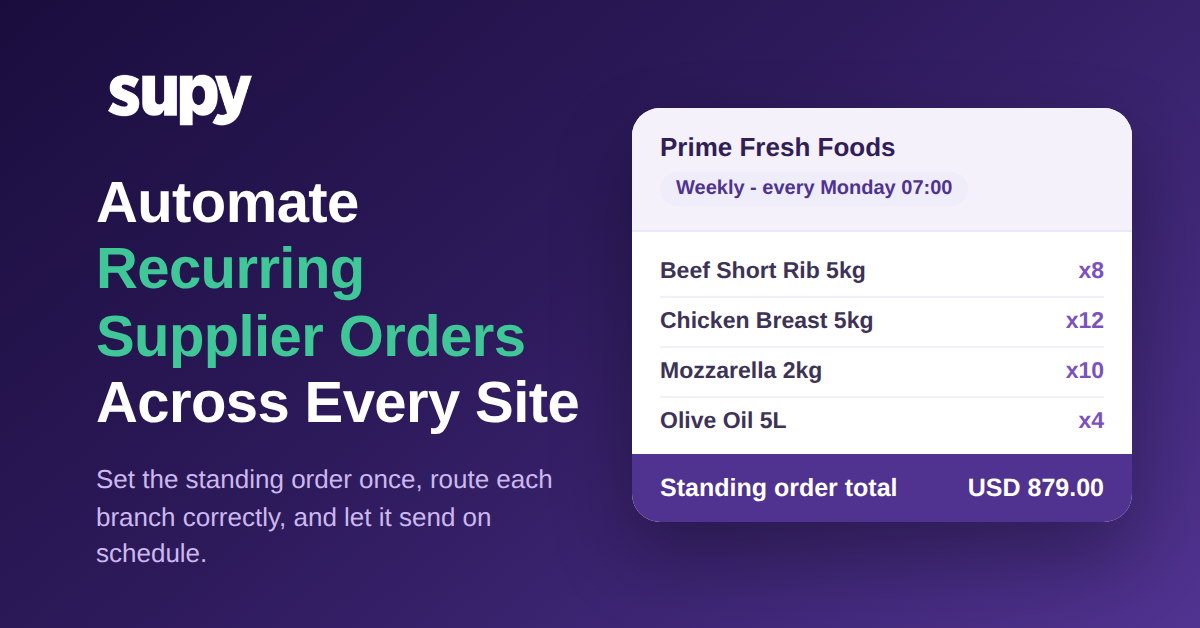
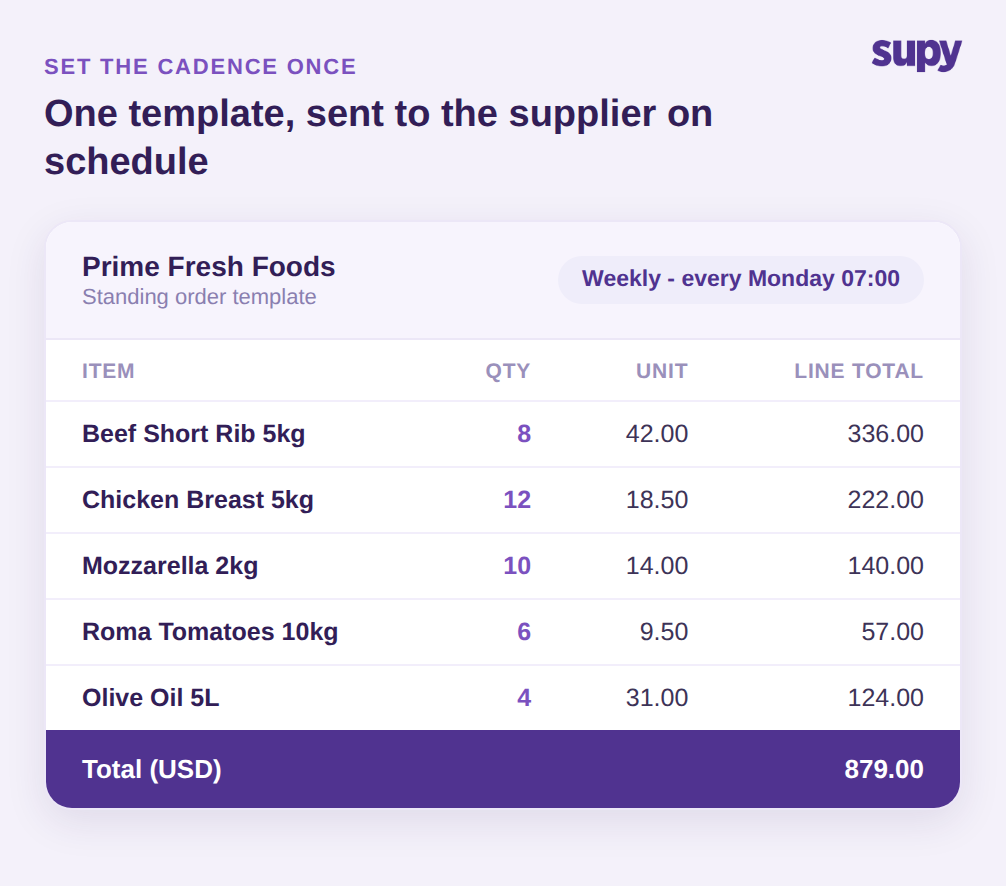
Das Herzstück einer Dauerbestellung ist der Rhythmus. Sie erstellen die Bestellvorlage einmal, wählen Artikel und Mengen aus und hängen dann einen Zeitplan an: jeden Montag um 07:00 Uhr, am ersten jeden Monats oder alle drei Tage. Von da an wird die Bestellung in diesem Rhythmus zusammengestellt und bewegt sich auf den Lieferanten zu, ohne dass ein Einkäufer sie erneut öffnen muss. Eine einzelne Vorlage kann Rindfleisch-Querrippe, Hühnerbrust, Mozzarella, Romatomaten und Olivenöl in festgelegten Mengen enthalten, mit einem Gesamtwert von rund 879 USD, der wöchentlich an denselben Lieferanten gesendet wird.
Eine Vorlage ist jedoch kein Einmal-einrichten-und-vergessen-Vertrag und sollte nicht so behandelt werden. Da sie als bearbeitbare Bestellung und nicht als feste Vereinbarung existiert, passen Sie sie an einem einzigen Ort an, wenn sich der Betrieb ändert: Erhöhen Sie die Frischwarenmengen vor einem saisonalen Höhepunkt, entfernen Sie einen Artikel, den ein Lieferant nicht mehr liefern kann, oder verschieben Sie die Sendezeit, um einen neuen Einsendeschluss zu treffen. Der Rhythmus läuft dabei weiter; Sie bearbeiten nur die Definition, ohne die Bestellung neu zu erstellen. Das ist der Unterschied zwischen dem Automatisieren einer Bestellung und dem bloßen Speichern einer Bestellung, die Sie noch immer erneut öffnen müssen.
Da die Vorlage die Mengen enthält, gibt sie Ihnen auch etwas, das manuelle Bestellungen nie bieten: eine stabile Basislinie. Wenn jede Lieferung gegen dieselbe Dauerbestellungsvorlage geprüft wird, kann die Preisdrift des Lieferanten nicht mehr verborgen bleiben. Bei einer manuellen Routine kann ein Lieferant einen Stückpreis um 7 % erhöhen, und dieser Anstieg bleibt 6 Wochen unbemerkt, weil es keine konsistente Bestellung gibt, mit der verglichen werden kann. Eine Dauerbestellung ist genau diese konsistente Bestellung. Die Vorlagenmenge und der erwartete Preis sind festgelegt, sodass jede Änderung in der Abrechnung des Lieferanten sofort als Abweichung erscheint, wenn die Rechnung eintrifft – und nicht ein Quartal später, wenn jemand die Ausgaben schließlich abgleicht.
Jede Filiale zu ihrem eigenen Lieferantenkonto routen
Der Grund, warum gruppenweite wiederkehrende Bestellungen scheitern, liegt selten an den Artikeln. Es liegt am Kontoruting. Ein großer Lieferant führt für jede Ihrer Filialen eine separate Kontonummer, und eine Bestellung, die unter dem falschen Konto gesendet wird, wird falsch weitergeleitet, verzögert oder zurückgeschickt. Eine einzelne Vorlage, die standortspezifische Konten ignoriert, ist daher schlimmer als nutzlos: Sie erzeugt Arbeit, anstatt sie zu beseitigen.
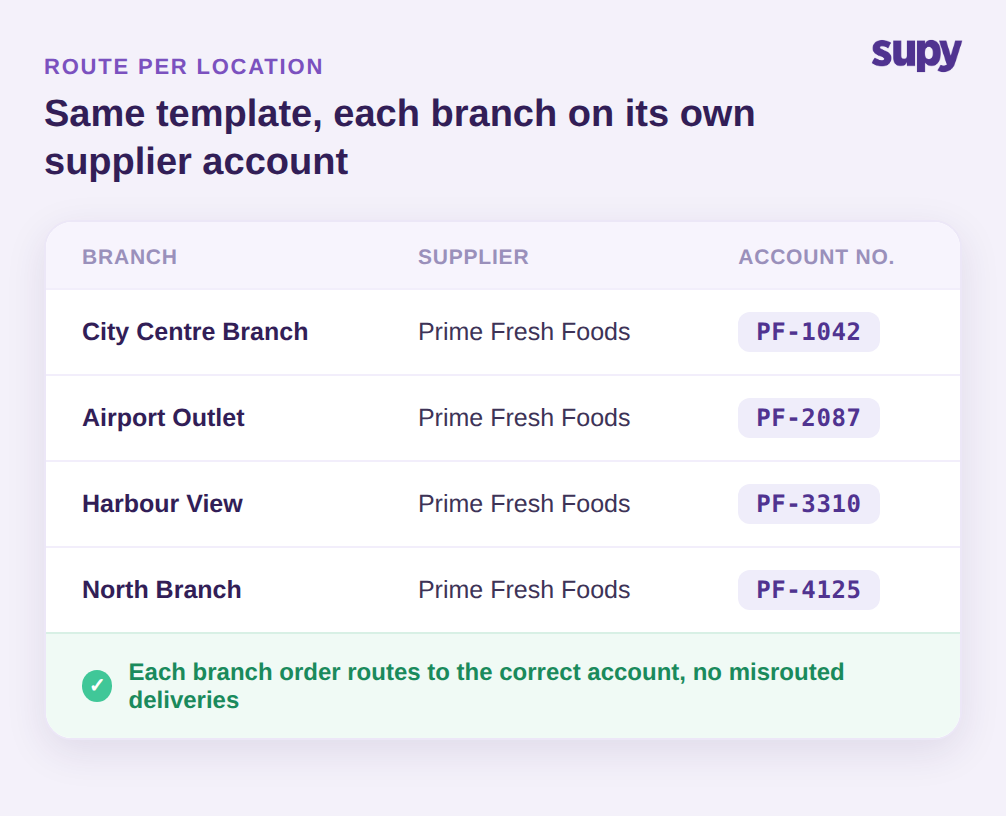
Supy löst dies, indem es ein standortspezifisches Lieferantenkonto in der Bestellung selbst führt. Dieselbe Dauerbestellungsvorlage kann für City Centre Branch, Airport Outlet, Harbour View und North Branch laufen, und jede Filiale erhält eine Kopie unter ihrer eigenen Kontonummer bei diesem Lieferanten: PF-1042, PF-2087, PF-3310, PF-4125. Die Lieferantenverwaltung enthält außerdem einen filialspezifischen Lieferungsplan und Einsendeschluss pro Lieferant und richtet jede Bestellung auf den korrekten Liefertag aus. Das praktische Ergebnis: Eine wiederkehrende Bestellungsdefinition skaliert sauber über alle Standorte hinweg, und keine Filiale bestellt versehentlich gegen das Konto eines anderen Standorts.
Outlet-übergreifenden Bedarf in einer Dauerbestellung bündeln
Das standortspezifische Routing löst die Korrektheit. Die Konsolidierung löst die Kosten. Wenn jedes Outlet dasselbe Grundprodukt separat bestellt, platzieren Sie ein Dutzend kleine, fragmentierte Bestellungen anstatt einer, die Ihr tatsächliches Gruppenvolumen widerspiegelt – und geben damit die Einkaufsmacht auf, die dieses Volumen einbringen sollte. Fragmentiertes Bestellen verbirgt auch Ihre wahre Position: Kein einzelner Einkäufer sieht jemals, dass die Gruppe dasselbe Produkt viermal an einem Morgen kaufen wird. Eine Dauerbestellung über mehrere Standorte hinweg ermöglicht es Ihnen, das umzukehren.
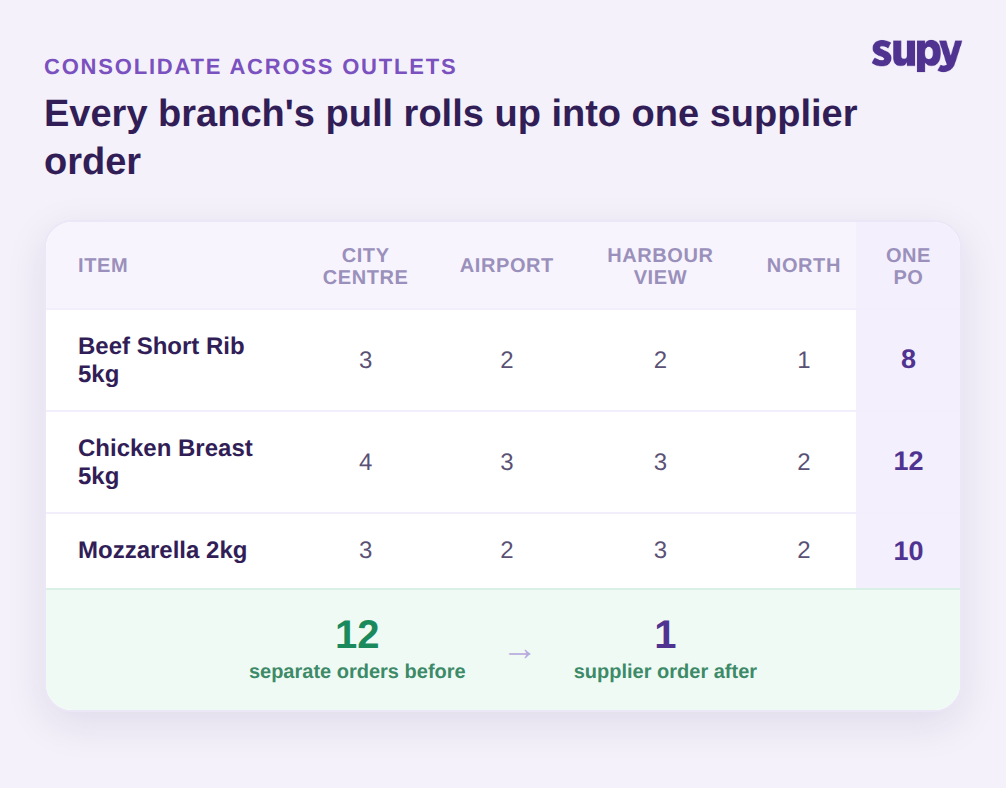
Supy aggregiert ausstehenden Bedarf aller Outlets in einer einzigen konsolidierten Beschaffungsübersicht und wandelt ihn dann in Lieferantenbestellungen im Bulk um, statt standortweise. Bei einem einzigen wiederkehrenden Rhythmus fließen drei Einheiten Rindfleisch-Querrippe von City Centre, zwei vom Airport, zwei vom Harbour View und eine von North in eine einzige Zeile mit acht Einheiten in einer Lieferantenbestellung zusammen. Wenden Sie das auf den gesamten Katalog an, und eine Gruppe, die früher 12 separate wöchentliche Bestellungen bei einem Lieferanten aufgab, gibt nur noch 1 auf. Der Einkäufer sieht eine konsolidierte Übersicht, der Lieferant erhält eine saubere Bestellung, und Ihre Gruppe bestellt in jedem Zyklus auf Gruppenebene, ohne dass jemand die Filialen manuell zusammenführen muss. Außerdem macht es die Dauerbestellung zu einer Planungsfläche statt nur einem Sendeknopf: Da die konsolidierte Ansicht den Bedarf jeder Filiale gegenüber derselben Vorlage zeigt, kann ein Gebietsleiter das Outlet erkennen, das still doppelt bestellt, oder den Standort, der den Rhythmus verlassen hat – bevor daraus ein Lieferengpass oder ein Abschreibungsposten wird.
Genehmigung und Lieferung unter Ihrer Kontrolle behalten
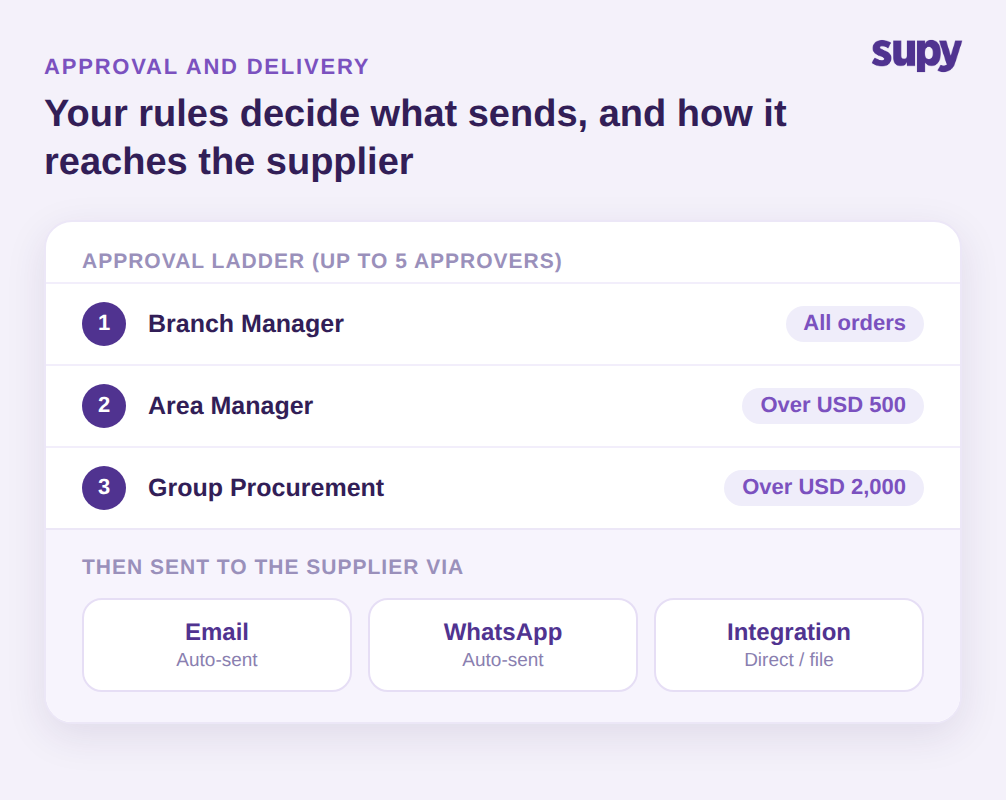
Automatisierung gewinnt Vertrauen, wenn sie niemals den menschlichen Kontrollpunkt entfernt, den Sie tatsächlich benötigen. Eine Dauerbestellung muss nicht still in eine aktive Bestellung umgewandelt werden. Sie können eine Genehmigungsleiter davor schalten: Supy unterstützt sequenzielle Genehmigungen mit bis zu 5 Genehmigern, ausgelöst nach Filiale und Bestellwert, sodass eine routinemäßige Frischwarenbestellung unter 500 USD direkt durchlaufen kann, während alles über einem festgelegten Schwellenwert auf eine Gebiets- oder Gruppenfreigabe wartet. Die wiederkehrende Vorlage erledigt die Eingabe; Ihre Regeln entscheiden, was noch ein menschliches Ja benötigt, bevor es gesendet wird.
Nach der Genehmigung erreicht die Bestellung den Lieferanten über den von Ihnen eingerichteten Kanal: automatisch per E-Mail oder WhatsApp gesendet, oder direkt über eine Integration in das System des Lieferanten übertragen, mit über 75 verfügbaren Integrationen für die Systeme, die Gruppen bereits verwenden. Für Lieferanten, die für strukturierten elektronischen Austausch eingerichtet sind, kann die Bestellung als Datendatei übermittelt werden, die Bestellnummer, Lieferdatum, Mengen und Lieferantenartikelcodes enthält, sodass sie direkt in deren System landet. In jedem Fall gilt der Kernpunkt einer Dauerbestellung: Die wiederkehrende Arbeit erfolgt planmäßig, Routing und Genehmigungen bleiben unter Ihrer Kontrolle, und ein Einkäufer greift nur für die Ausnahmen ein.
Wenn Sie wissen möchten, ob Dauerbestellungen Ihrer Gruppe helfen würden, führen Sie diese Woche eine kurze Prüfung durch. Ziehen Sie die Lieferantenbestellungen des letzten Monats und markieren Sie jede Zeile, die sich in einem vorhersehbaren Rhythmus wiederholt; wenn ein großer Anteil Ihrer wöchentlichen Ausgaben dieselben Artikel in ähnlichen Mengen sind, ist das die Basis, die Sie zuerst auf Vorlagen übertragen sollten. Beginnen Sie mit einem häufig bestellenden Lieferanten, erstellen Sie die Dauerbestellung in den Mengen, die Sie bereits bestellen, bestätigen Sie, dass jede Filiale ihre eigene Kontonummer führt, und legen Sie den Rhythmus so fest, dass er den Liefertagen entspricht, die Sie bereits einhalten. Behalten Sie einen Genehmigungsschwellenwert für alles über einem Wert, mit dem Sie sich wohl fühlen. Lassen Sie wirklich variable, umsatzgesteuerte Artikel bei der vorausschauenden Bestellung oder manuellen Überprüfung. Lassen Sie einen Lieferanten sauber auf einer Dauerbestellung laufen, messen Sie die zurückgewonnenen Stunden und die aufgedeckten Preisabweichungen, und rollen Sie dann dasselbe Muster Lieferant für Lieferant über alle Standorte hinweg aus.