.jpeg)


So führen Sie eine Restaurant-Tech-Stack-Überprüfung durch – Erkenntnisse des ehemaligen IT-Leiters von Wingstop & Popeye's
Von William Connors, Head of IT (ex-Wingstop, Wahaca, Popeye's, Burger King & Chotto Matte)
Bei Restaurant-Technologie geht es nicht um ausgefeilte Software – sondern darum, echte Probleme im Chaos des täglichen Betriebs zu lösen.
Nach Jahrzehnten als IT-Leiter für Marken wie Wingstop, Popeye's, Burger King und Wahaca zeige ich Ihnen, wie ich eine Tech-Stack-Überprüfung angehe, die wirklich Ergebnisse liefert – und nicht nur Dashboards.
Klicken Sie unten, um meine kostenlose Vorlage zur Überprüfung des Restaurant-Tech-Stacks herunterzuladen und beim Lesen zu verwenden.
1. Mit dem Kundenerlebnis beginnen
Öffnen Sie keine Tabelle. Betreten Sie das Restaurant als Gast. Es ist überraschend, wie viele Tools versprechen, die Gasterfahrung zu verbessern – und dabei still und leise das Gegenteil bewirken.
Maßnahmen:
- Betreten Sie Ihr Restaurant wie ein Kunde
- Bestellen Sie per App, Kiosk oder QR-Code. Probieren Sie die Einlösung von Treuepunkten
- Notieren Sie jeden Reibungspunkt
„Ein Mann hat einen QR-Code drei Mal gescannt und es hat nicht funktioniert. Als echter Kunde wäre ich gegangen."
– William Connors
💡 Tipp: Technologie, die zu 80 % der Zeit funktioniert, ist nicht gut genug. Ihre Gäste werden keine Bugs melden – sie kommen einfach nicht mehr.
2. Diagnose vor dem Austausch
Bevor Sie nach neuen glänzenden Tools suchen, beheben Sie zunächst, was nicht funktioniert.
Hier verfallen die meisten Menschen in Panik und geben dem System die Schuld. Aber nach meiner Erfahrung liegt das Problem meist nicht an der Software – sondern an der Konfiguration.
Wenn das System jedoch richtig eingerichtet ist und trotzdem nicht das leisten kann, was Sie brauchen, ist das Ihr Signal, es zu ersetzen – nicht zu flicken.
Fragen Sie sich:
- Sind wir sicher, dass das System defekt ist – oder ist es nur nicht richtig eingerichtet?
- Haben wir alle Zuordnungen, Kategorien und Einheiten überprüft?
- Wurde das Team richtig geschult?
- Wenn die Einrichtung solide ist, das Ergebnis aber immer noch schlecht ist – ist das das falsche Tool für den Job?
„Ich war in einem Restaurant, wo POS und Warenbestandsberichte nicht übereinstimmten. Es stellte sich heraus, dass 20 % der Produkte nicht richtig zugeordnet waren – deshalb sah alles defekt aus. Sobald ich die Konfiguration korrigiert hatte, ergab alles wieder Sinn."
– William Connors
⚠️ Häufiger Fehler: Zu denken, man braucht neue Technologie, obwohl man nur eine ordentliche Einrichtung und Schulung braucht.
3. Umbauen – nicht neu aufbauen
Ja, einige Systeme müssen ersetzt werden. Aber den gesamten Tech-Stack herauszureißen und von vorne anzufangen, ist oft schädlicher als hilfreich.
Die meisten Betriebe können sich diese Art von Unterbrechung nicht leisten – und Ihr Personal kann nur so viele Veränderungen auf einmal verkraften.
Beginnen Sie mit Ihrem größten Schmerzpunkt und beheben Sie diesen. Dann bauen Sie von dort aus weiter.
Maßnahmen:
- Listen Sie Ihre 3 wichtigsten Geschäftsziele auf (z. B. Wareneinsatz in Echtzeit senken, Bestellungen beschleunigen, manuelle Aufgaben reduzieren)
- Fragen Sie sich für jedes Tool: Hilft uns das, diese Ziele zu erreichen?
- Falls die Antwort nein lautet, notieren Sie es als Verbesserungsbedarf
4. Erfolgsdefinition festlegen
Jedes Tool in Ihrem Stack sollte eine Aufgabe haben. Definieren Sie, was „besser" bedeutet, wie Sie es messen und wann Sie es überprüfen werden.
„Technologie ist keine Kostenstelle. Sie ist ein Profitcenter – wenn Sie sie richtig einsetzen." William Connors
Ein Projekt, das ich leitete, sparte £300K an Kartengebühren und £150K im Betrieb – alles durch das Setzen klarer Ziele und anschließende Modernisierung der Tools, um diese zu erreichen.
Maßnahmen:
- Für jeden Teil Ihres Tech-Stacks (POS, Warenbestand, Bestellungen, CRM usw.):
- Definieren Sie den spezifischen Schmerzpunkt, den es löst
- Beschreiben Sie, wie „Erfolg" aussieht (z. B. Lagerabweichung von 8 % auf 3 % senken)
- Wählen Sie, wie Sie es messen (z. B. Dashboards, Abweichungsberichte, Kundenfeedback)
- Legen Sie ein Überprüfungsdatum fest (z. B. 30, 60 oder 90 Tage nach Implementierung)
- Vereinbaren Sie, wer für die Nachverfolgung und Berichterstattung verantwortlich ist
5. Den Stack nach Geschäftsfunktionen organisieren
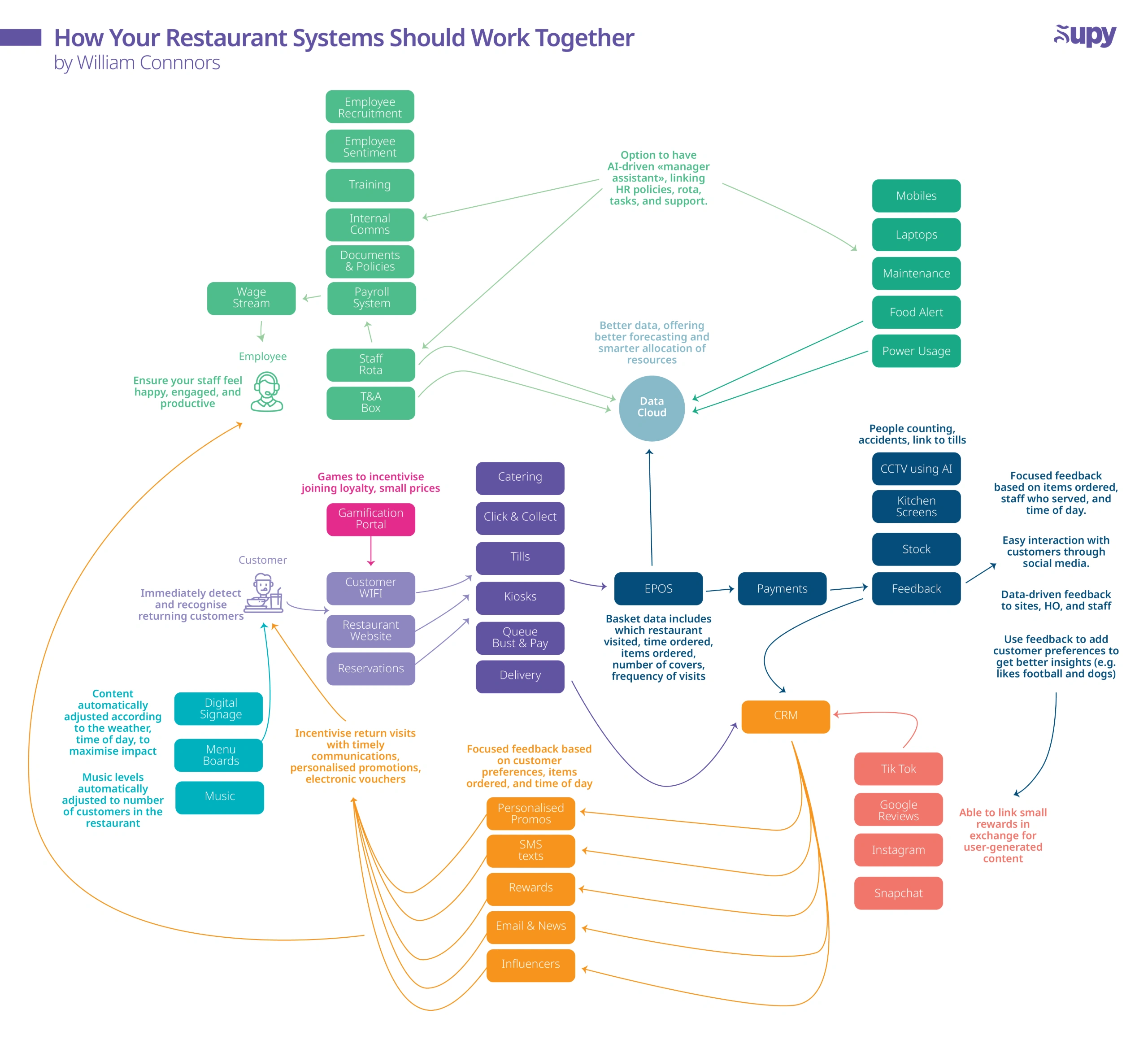
Eine vollständige Tech-Stack-Überprüfung kann überwältigend sein – also teilen Sie sie auf. Ich gruppiere Tools immer nach ihrer Funktion: Front-of-House, Back-of-House, CRM und so weiter. So können Sie jeden Bereich einzeln prüfen und beurteilen, wie gut sie miteinander verbunden sind.
Maßnahmen:
- Überprüfen Sie jede Geschäftsfunktion unten
- Listen Sie die derzeit verwendeten Tools auf
- Identifizieren Sie Lücken, Überschneidungen oder manuelle Umgehungslösungen
.png)
6. Integrationen priorisieren
„Man bemerkt nicht, was fehlt, wenn man nicht wusste, dass es existiert."
Schlechte Integrationen sind der häufigste Grund, warum Tech-Stacks auseinanderbrechen.
Tools, die nicht miteinander kommunizieren, erzeugen blinde Flecken, doppelte Arbeit und kostspielige Fehler. Wenn Ihr POS, Ihr Warenbestand und Ihre Buchhaltungssysteme nicht eng miteinander verbunden sind, füllen Sie die Lücken manuell – oder arbeiten, schlimmer noch, mit fehlerhaften Daten.
Maßnahmen:
- Kartieren Sie die Ein- und Ausgaben jedes Tools – womit ist es verbunden und wie?
- Identifizieren Sie fehlerhafte oder manuelle Verbindungen (z. B. CSVs, PDFs, E-Mail-Ketten)
- Sprechen Sie mit Anbietern: Welche Integrationen gibt es? Wer wartet sie? Wie werden Probleme gelöst?
- Priorisieren Sie Anbieter mit offenen APIs, nativen Integrationen und reaktionsschnellem Support
💡 Tipp: Wählen Sie Tools, die dafür gebaut wurden, miteinander zu kommunizieren – oder bereiten Sie sich darauf vor, Daten für immer nachzujagen.
7. Nutzen Sie, wofür Sie bezahlen
„Jeder Anbieter sagt: ‚Sie nutzen nur 10 % von dem, was wir anbieten.'"
Ich habe großartige Tools gesehen, die verstauben, nur weil niemand gelernt hat, sie zu benutzen.
Das Ergebnis? Umgehungslösungen, verschwendetes Geld und Funktionen, die nie aktiviert werden.
Maßnahmen:
- Fragen Sie Anbieter: „Welche Funktionen nutzen wir nicht, die wir nutzen sollten?"
- Planen Sie alle 6–12 Monate ein Auffrischungs-Onboarding
- Weisen Sie jedem Tool eine verantwortliche Person in Ihrem Team zu
- Nutzen Sie reale Beispiele (z. B. Schwund, Gutschriften oder Kostensteigerungen), um zu testen, was möglich ist
Fragen Sie sich:
- Können wir Schwund mit Belegen verfolgen (z. B. Fotos)?
- Simulieren wir Kosten live und reagieren schnell?
- Können wir Lieferantenstreitigkeiten ohne Papierspur lösen?
8. Infrastruktur ist auch wichtig
Selbst die besten Tools versagen ohne die richtigen Grundlagen. Infrastruktur sollte Teil Ihrer Tech-Stack-Überprüfung sein – und das umfasst mehr als nur WLAN.
„In einem Restaurant verloren sie mitten in einer Aufgabe das WLAN. Alle Einträge verschwanden."
Alte Tablets, schwaches Signal in Lagerbereichen oder gemeinsam genutzte Anmeldedaten können dazu führen, dass Technologie lautlos versagt – und das Vertrauen des Teams schnell verliert.
Maßnahmen:
- Überprüfen Sie die WLAN-Abdeckung in Küchen-, Lager- und Aufbewahrungsbereichen
- Testen Sie die Offline-Funktionalität Ihrer Apps
- Überprüfen Sie Mitarbeitergeräte: Sind sie zuverlässig, kompatibel und einheitlich?
- Stellen Sie sicher, dass Berechtigungen rollenbasiert und nicht geteilt sind
- Bestätigen Sie, dass Apps Daten speichern und synchronisieren, wenn das Signal abbricht
9. Über das Offensichtliche hinausschauen
Die besten Möglichkeiten sind oft die, über die niemand spricht. Hier sind einige der versteckten Hebel, nach denen ich suche:
- Gäste-WLAN kann mit Treueprogrammen verknüpft werden und die Besuchshäufigkeit verfolgen
- CCTV kann in den Warenbestand integriert werden, um Schwund, Missbrauch oder Schlangenabbrüche zu identifizieren
- Back-of-House-Tools, die auf Basis historischer Nachfrage eine intelligentere Vorbereitung unterstützen, können Verschwendung und Überbestellung reduzieren
- Personaltools mit flexiblem Gehaltsabruf können die Moral steigern, die Fluktuation reduzieren und Fehlschichten verringern
10. Abschließender Gedanke: Technologie sollte Ihnen helfen, besser zu schlafen
„Die Leute denken, Restaurants seien einfach, weil jeder kochen kann. Aber es gibt so viele Versagenspunkte – und so viele Möglichkeiten, den Gast zu begeistern."
Der beste Tech-Stack ist nicht nur einer, der funktioniert – er ist einer, der zusammen funktioniert, Margen verbessert und das Leben für Ihr Personal und Ihre Gäste besser macht.
✅ TL;DR: So führen Sie eine Restaurant-Tech-Stack-Überprüfung durch
Schritt-für-Schritt-Checkliste:
- Erleben Sie Ihr Restaurant als Gast – finden Sie die Reibungspunkte
- Beheben Sie, was defekt ist, bevor Sie nach neuen Tools suchen
- Setzen Sie klare Ziele dafür, wie Erfolg aussieht
- Überprüfen Sie jeden Bereich Ihres Betriebs (POS, BOH, CRM usw.)
- Prüfen Sie Integrationen – wo sind die Lücken?
- Überprüfen Sie die Infrastruktur – WLAN, Geräte, Offline-Zugang
- Nutzen Sie den vollen Wert der Tools, für die Sie bereits bezahlen
- Priorisieren Sie Upgrades, die den größten Schmerzpunkt zuerst lösen
- Erstellen Sie eine Roadmap – umbauen, nicht neu aufbauen
- Messen Sie den ROI und passen Sie an, während Sie wachsen
Möchten Sie Hilfe bei der Überprüfung Ihres Restaurant-Tech-Stacks?
Ich habe mit Marken wie Wingstop, Popeye's, Burger King, Chotto Matte, Alley Cats Pizza und Wahaca gearbeitet – und ich habe gesehen, was funktioniert (und was absolut nicht funktioniert).
📞 Demo buchen bei Supy um:
- Den Warenbestandsteil Ihres Stacks zu optimieren
- Praktische POS-Empfehlungen zu erhalten
- Zeit und Geld für die falschen Tools zu sparen
✅ Mein kostenloses Arbeitsblatt herunterladen, um Ihre eigene Tech-Stack-Überprüfung durchzuführen – denselben Prozess, den ich mit Betreibern verwende, um schnelle Erfolge und langfristige Verbesserungen zu entdecken.