.jpeg)


ما هو برنامج إدارة المطاعم؟ دليل شراء شامل لمشغّلي المواقع المتعددة
.png)
إذا بحثت عن "برنامج إدارة المطاعم"، فقد لاحظت المشكلة على الفور:
بعض المُوردون يقصدون به POS.
وآخرون يقصدون جدولة العمالة.
وآخرون يقصدون المخزون.
وآخرون يقصدون كل شيء - حتى حين يكون ذلك غير دقيق.
إليك التعريف العملي الذي يساعدك فعلاً على شراء المنتج الصحيح.
ما الذي تعنيه "برنامج إدارة المطاعم" فعلاً
برنامج إدارة المطاعم هو المنظومة المتكاملة من الأدوات التي تستخدمها لإدارة العمليات اليومية للمطعم - عبر العمالة والمبيعات والمخزون والمشتريات والتقارير.
بالنسبة لـمشغّلي المواقع المتعددة، ليس هذا منتجاً واحداً. إنه منظومة تقنية.
والهدف الحقيقي ليس "نظام واحد يفعل كل شيء". بل:
أفضل أدوات متخصصة لكل وظيفة - متكاملة بحيث تتدفق البيانات بسلاسة عبر المجموعة.
هذا هو النهج الحديث: برنامج عمليات المطاعم الذي يتصرف كنظام تشغيل واحد، حتى حين يتكون من منتجات متخصصة.
لماذا تفشل الفرق متعددة المواقع مع برامج المطاعم "الكل في واحد"
لا تعاني معظم المجموعات لأنها تفتقر إلى البرامج.
تعاني لأن لديها:
- أدوات لا تتناسب مع طريقة عمل الأعمال فعلياً
- بيانات محاصرة في صوامع (POS مقابل المخزون مقابل الفواتير مقابل العمالة)
- التقارير تصل بعد فوات الأوان
- "حلول مؤقتة" (جداول بيانات) تتحول بهدوء إلى نموذج التشغيل
بالنسبة للعلامات التجارية متعددة المواقع، التكلفة الخفية هي عدم الاتساق:
- الموقع أ يطلب بطريقة، والموقع ب بطريقة أخرى
- الطهاة يحسبون تكاليف الوصفات بشكل مختلف
- المالية تطابق الفواتير يدوياً
- العمليات لا تثق بالأرقام عبر المجموعة
لهذا لا يكتفي أفضل المشغّلين بـ"شراء برامج".
يصممون منظومة إدارة متعددة المواقع توحّد سير العمل وتظل مرنة حيثما يهم.
الوحدات الأساسية لمنظومة إدارة المطاعم الحديثة
فيما يلي أبسط طريقة للتفكير في برنامج إدارة المطاعم للعمليات متعددة المواقع - الطبقات الرئيسية وما تفعله وكيف يبدو "الجيد".
1) نظام POS وبيانات المبيعات
نظام POS هو مصدر الحقيقة للمعاملات ومزيج المنتجات.
ما الذي تبحث عنه:
- هيكل واضح للأصناف والمعدّلات
- التكاملات المستقرة وخيارات التصدير
- إدارة قائمة الطعام متعددة المواقع (حتى تعني المنتجات الشيء ذاته في كل مكان)
هذا مهم لأن أفضل القرارات اللاحقة (المشتريات والتحضير والتنبؤ وهندسة القائمة) تعتمد على مدخلات مبيعات دقيقة.
2) التحكم في عمليات المطبخ
هنا تُكسب أو تُخسر الهوامش: إدارة المخزون والأتمتة في المشتريات، وتكاليف الوصفات، والاستلام، وأداء المُوردون.
يجب أن يشمل نظام قوي للمطبخ:
- سير عمل الطلبات (طلبات الشراء)
- إدارة التسعير وكتالوج المُوردون
- استلام البضاعة والتقاط الفاتورة
- إشعارات الائتمان والتناقضات
- جرد المخزون وعمليات النقل
- إدارة الوصفات والأداء النظري مقابل الفعلي
- صلاحيات متعددة المواقع وسجلات المراجعة
إذا كنت جاداً بشأن التوسع، فإن عمليات المطبخ ليست "إدارة". إنها مركز تحكمك.
أين تناسب Supy: بُنيت Supy تحديداً لهذه الطبقة من عمليات المطبخ - المشتريات وإدارة المخزون وذكاء الأعمال - مصممة لتوحيد سير العمل عبر مواقع متعددة، وأتمتة المشتريات والاستلام، وتحويل البيانات التشغيلية إلى تقارير في الوقت الفعلي.
3) العمالة والموارد البشرية والجدولة
هذا هو الجانب الآخر من الربحية.
يجب أن يدعم جدولة المطاعم الجيد وأدوات العمالة:
- تخطيط جداول العمل بناءً على الطلب
- أهداف العمالة حسب الدور
- الامتثال (فترات الراحة وأوقات العمل وقواعد العقود)
- التكاملات مع الحضور والانصراف
- متابعة متعددة المواقع دون فقدان التحكم المحلي
كثيراً ما يُباع هذا التصنيف باسم "برنامج إدارة المطاعم" - لكنه في الحقيقة وحدة رئيسية واحدة في المنظومة الأشمل.
4) المحاسبة والمالية
هنا تتحول العمليات النظيفة إلى دفاتر نظيفة.
ما الذي تبحث عنه:
- قواعد ترحيل موثوقة وتعيين مخطط الحسابات
- سير عمل الفواتير الآلية (أو استيراد سهل على الأقل)
- دعم واضح للمستحقات وانضباط إغلاق الفترة
- التعامل مع كيانات متعددة إذا احتجت إلى ذلك
5) التقارير ولوحات المعلومات في الوقت الفعلي
هذا هو الغراء الذي يحوّل الأنظمة إلى قرارات.
المشغّلون لا يحتاجون إلى مزيد من التقارير. يحتاجون إلى:
- لوحات معلومات التقارير في الوقت الفعلي التي تجيب على "ما الذي تغير؟" اليوم/هذا الأسبوع
- التنبيهات عند انجراف التكاليف (أسعار المُوردون وتكاليف الوصفات والهدر والتباين)
- متابعة على مستوى الموقع مع تعريفات موحدة على مستوى المجموعة
نموذج "أفضل تخصص + متكامل" (ما يريده المشغّلون فعلاً)
إليك النموذج الذي يتوسع:
- POS (مصدر الحقيقة للواجهة الأمامية)
منصة عمليات المطبخ (المشتريات والمخزون والوصفات والاستلام) - العمالة (الجدولة والحضور والانصراف)
- المحاسبة (المالية والترحيل)
- طبقة ذكاء الأعمال (لوحات المعلومات والتنبيهات ومؤشرات الأداء الموحدة)
المفتاح ليس استبدال كل شيء.
بل اختيار أفضل الأدوات - ثم التأكد من أنها تتواصل مع بعضها بشكل موثوق عبر التكاملات أو API.
لهذا، حين تقيّم برنامج إدارة المطاعم اليوم، يجب أن تسأل فعلاً:
"هل هذه وحدة قوية في منظومتي - وهل تتكامل بسلاسة مع بقية المنظومة؟"
قائمة مراجعة المشتري: كيف تختار برنامج إدارة المطاعم للعمليات متعددة المواقع
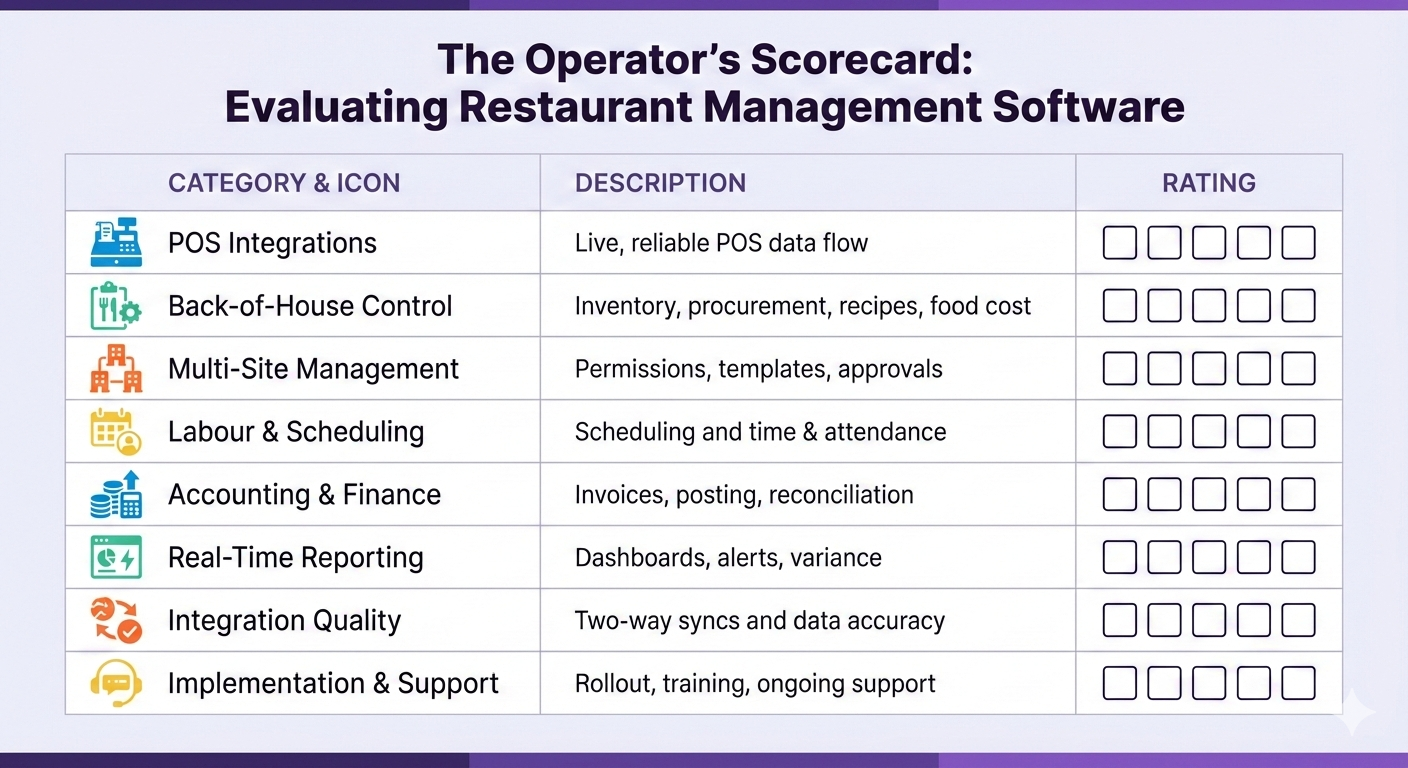
إذا كنت ستستخدم قسماً واحداً فقط من هذا الدليل، فاستخدم هذا.
أ. ابدأ بالنتائج (لا بالميزات)
اختر 3-5 نتائج تحتاجها هذا الربع، مثل:
- تقليل التباين في تكلفة الغذاء عبر المواقع
إيقاف زحف التسعير لدى المُوردون دون أن يُلاحَظ - تقليل وقت الجرد وتحسين دقة العد
- إلغاء مطابقة الفواتير اليدوية وإشعارات الائتمان الفائتة
- توحيد موافقات المشتريات وضوابطها
ثم اشترِ لتحقيق تلك النتائج.
ب. أولوية واقعية التكامل على تسويق التكامل
اطرح هذه الأسئلة مبكراً:
- ما التكاملات مع POS المطاعم المتاحة اليوم فعلاً (لا "في خارطة الطريق")؟
- هل عملية تكامل البيانات ثنائية الاتجاه أم أحادية؟
- ما تكرار المزامنة؟
- ما الذي ينهار أولاً عند تغيير القوائم أو تغيير المُوردون أو فتح مواقع جديدة؟
- من يتولى الدعم حين يحدث عطل؟
ج. اختبر التحكم في المواقع المتعددة تحت الضغط
يظهر تعقيد المواقع المتعددة في:
- الصلاحيات (من يمكنه الموافقة والتعديل والتجاوز)
- القوالب (الجرد والطلبات والوصفات)
- إدارة بيانات قائمة الأصناف الرئيسية
- عمليات النقل والمطبخ المركزي ووحدات الإنتاج
- اتساق التقارير (تعريف مؤشر الأداء ذاته في كل مكان)
إذا كانت المنصة "أحادية الموقع بتسجيل دخول متعدد المواقع"، فستشعر بذلك سريعاً.
د. تأكد من دعمها لسير العمل التشغيلي، لا التقارير فقط
كثير من الأدوات تُظهر لك المشاكل.
أفضل الأدوات تساعدك على حلها:
- تناقضات السعر ← سير عمل للحل
- مشاكل الفاتورة ← عملية إشعار ائتمان
- التباين ← تحليل جذر السبب
- انجراف تكلفة الوصفة ← تتبع التغيير والمتابعة
هـ. لا تتجاهل التطبيق
بالنسبة للمجموعات متعددة المواقع، التطبيق جزء من المنتج.
ابحث عن:
- نهج نقل البيانات (الأصناف والمُوردون والوصفات والمواقع)
- خطة تدريب حسب الدور (العمليات والمالية وفرق المتاجر)
- تسلسل بدء التشغيل (تجريبي ← طرح تدريجي)
- نموذج الدعم المستمر
أنماط شائعة للمنظومات التقنية (للتحقق من منظومتك)
إليك ثلاثة أنماط "طبيعية" لمشغّلي المواقع المتعددة:
1) منظومة يقودها POS
الأفضل حين يكون POS قوياً بالفعل وتبني حوله.
- POS مستقر
- تحتاج إلى عمليات مطبخ أفضل وتقارير أفضل
2) منظومة تقودها عمليات المطبخ
الأفضل حين تكون الهوامش هي الأولوية وتحتاج إلى تحكم أدق بالتكاليف.
- إدارة المخزون والمشتريات والفواتير هي أكبر نقاط الألم
- تحتاج إلى اتساق على مستوى المجموعة في الطلبات والمخزون
3) منظومة تقودها المالية
الأفضل حين تكون نقطة الألم إغلاق الدفاتر ومطابقة الإنفاق.
- تحتاج إلى الأتمتة في الفواتير
- تحتاج إلى ترحيل نظيف وفترات نظيفة وتقارير نظيفة
تنتهي معظم المجموعات المتنامية بالجمع بين الثلاثة - لكن عادةً واحداً منها يقود قرار الشراء أولاً.
أين تناسب Supy في منظومة برامج إدارة المطاعم
Supy ليست نظام POS، وليست أداة جدولة.
Supy هي طبقة التحكم في عمليات المطبخ - حيث توحّد المشتريات والمخزون ومتابعة التكاليف عبر المجموعة، وتربط تلك البيانات التشغيلية بلوحات المعلومات واتخاذ القرار.
إذا كنت تبني منظومة متكاملة بأفضل التخصصات، فإن Supy عادةً ما تجلس جانب:
- نظام POS الخاص بك (بيانات المبيعات وهيكل القائمة)
- منصة المحاسبة (الترحيل والتسوية)
- أدوات العمالة (جدولة الموظفين والحضور والانصراف)
أفكار ختامية: اشترِ منظومة، لا كلمة رنانة
"برنامج إدارة المطاعم" ليس عملية شراء واحدة.
إنه نموذج تشغيلي متكامل:
- الأدوات الصحيحة لكل وظيفة
- تدفق بيانات متكامل
- سير عمل موحد
- متابعة في الوقت الفعلي تدفع إلى العمل
إذا أردت معرفة كيف تناسب Supy منظومة إدارة مطاعم حديثة بأفضل التخصصات، احجز عرضاً توضيحياً هنا، أو لمراجعة فريقنا للمنظومة التقنية وتقديم النصيحة حول الحلول الأفضل لإعدادك التشغيلي، راسلنا على sales@supy.io بالقول "يرجى مراجعة منظومتي التقنية".
أسئلة شائعة
هل برنامج إدارة المطاعم هو نفسه POS؟
لا. نظام POS هو وحدة أساسية واحدة (المبيعات). يشير برنامج إدارة المطاعم عادةً إلى المنظومة التشغيلية الأشمل: POS وعمليات المطبخ والعمالة والمحاسبة والتقارير - مثالياً متكاملة.
ما أهم وحدة لمشغّلي المواقع المتعددة؟
يعتمد على أكبر قيودك. تحقق معظم المجموعات متعددة المواقع أسرع تأثير على الهامش من تشديد التحكم في عمليات المطبخ (المشتريات والمخزون والوصفات وسير عمل الفواتير والاستلام) وربطها بالتقارير في الوقت الفعلي.
هل أحتاج إلى منصة كل في واحد؟
ليس عادةً. الاتجاه لمشغّلي المواقع المتعددة هو أفضل التخصصات + التكاملات القوية، لأن كل مجال (POS والجدولة وعمليات المطبخ والمحاسبة) له متطلبات متخصصة.
ماذا أسأل الموردين عن التكاملات؟
اسأل عن التكاملات مع POS/المحاسبة المتاحة اليوم، وإن كانت المزامنة فورية أم على دُفعات، وإن كانت أحادية أم ثنائية الاتجاه، وما البيانات المشمولة (الأصناف والمعدّلات والمواقع والضرائب)، ومن يدعم المشاكل حين ينهار شيء.
ما هي "أنظمة التحكم في تكلفة الغذاء" عملياً؟
عادةً: وصفة وتكاليف نظرية، وتتبع المخزون، وضوابط المشتريات، ودقة الاستلام والفواتير، وتتبع التباين والهدر، وتقارير ترصد الانجراف مبكراً بما يكفي للتصرف.
كم تستغرق عملية التطبيق للمجموعات متعددة المواقع؟
يتفاوت ذلك بحسب جودة البيانات وعدد المواقع وتعقيد سير العمل. العامل الأكبر عادةً هو الاستعداد الداخلي: بيانات قائمة الأصناف الرئيسية وهيكل المُوردون والوصفات وتسلسل الطرح.

