.jpeg)


Rechnung im Restaurant 101: Manuelle Dateneingabe eliminieren
.jpeg)
- Was Rechnung-Verarbeitung in einem modernen Restaurantbetrieb beinhalten sollte
- Die versteckten Kosten manueller Dateneingabe (Zeit, Fehler, versäumte Gutschriften)
- Ein einfacher, skalierbarer Rechnung-Workflow, der repetitive Dateneingabe eliminiert
- Die Kontrollen, die Sie benötigen, um die Buchhaltung zufrieden zu stellen (ohne den Betrieb zu verlangsamen)
- So führen Sie dies über einen oder 30+ Standorte ein
Rechnung-Verarbeitung in Restaurants: Was tatsächlich dazugehört
Die meisten Teams behandeln „Rechnungsverarbeitung“ wie eine einzelne Verwaltungsaufgabe: Daten eingeben und ablegen.
In Wirklichkeit ist die Rechnung-Verarbeitung ein Finanzkontroll-Workflow, der Kosten, Lagerbestand, Beschaffung, Rezept-Rentabilität und Monatsabschlussgenauigkeit berührt. Ein sauberer Rechnung-Prozess umfasst in der Regel:
- Erfassung von Rechnungen je Lieferant (E-Mail, PDF, Papier, WhatsApp-Foto)
- Extraktion von Kopf- und Positionsdaten
- Abgleich mit Bestellungen und/oder Wareneingangsbelegen
- Validierung von Preisen, Mengen, Einheiten, Steuern und Rabatten
- Meldung von Abweichungen (und Anforderung von Gutschriften)
- Buchung in der Buchhaltung mit konsistenten Zuordnungen
- Sicherstellung, dass Kosten in COGS, Rezepte und Berichte einfließen
Wenn ein Teil dieser Kette manuell, inkonsistent oder verzögert ist, leiden Kostengenauigkeit und betriebliche Disziplin.
Warum manuelle Dateneingabe bei Skalierung versagt
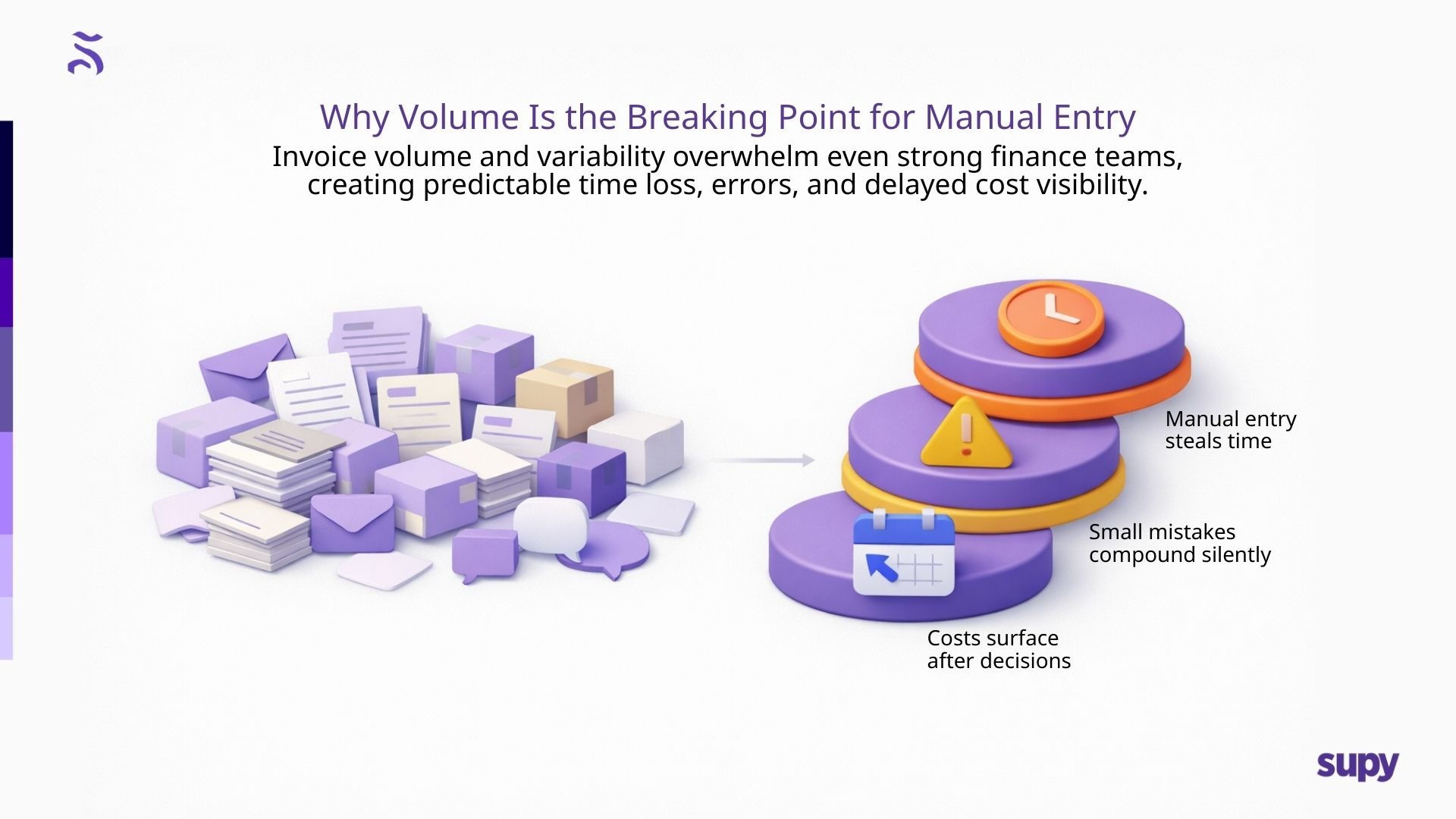
Manuelle Dateneingabe scheitert aus einem Grund: Menschen skalieren nicht über Tausende von Positionen.
Selbst starke Finanzteams haben Schwierigkeiten mit dem Volumen und der Variabilität von Restaurantrechnungen:
- Inkonsistente Lieferantenbezeichnungen
- Packungsgrößenänderungen und Substitutionen
- Geteilte Rechnungen und Teillieferungen
- Mehrere Formate, Sprachen und Artikelbeschreibungen
- Rechnungen über mehrere Kanäle
Manuelle Arbeit verursacht drei vorhersehbare Probleme:
1) Zeitkosten (und Opportunitätskosten)
Wenn Finanzteams Stunden mit der Eingabe verbringen, verlieren sie Zeit für höherwertige Arbeit: Marge-Analyse, Unterstützung bei Lieferantenverhandlungen und stärkere Kontrollen.
2) Fehlerrisiko
Kleine Eingabefehler (falsche Einheit, falsche Artikelzuordnung, falsch getippter Preis) summieren sich zu Berichtsungenauigkeiten.
3) Verzögerung
Spätes Buchen bedeutet, dass Kosten die G&V treffen, nachdem Entscheidungen bereits getroffen wurden. Betreiber verwalten veraltete Daten.
Das „Clean Invoice Workflow“-Modell
Wenn Ihr Ziel ist, manuelle Dateneingabe ohne Kontrollverlust zu eliminieren, ist das beste Modell:
Erfassen → Validieren → Lösen → Synchronisieren
Erfassen: Rechnungen werden konsistent gesammelt, unabhängig von der Quelle.
Validieren: Positionen werden gegen genehmigte oder historische Preise geprüft.
Lösen: Ausnahmen werden schnell angezeigt (Preisabweichungen, fehlende Artikel).
Synchronisieren: Nach Genehmigung fließen Rechnungen sauber in Buchhaltung und Kostensysteme.
Dies schafft zwei Ergebnisse, die Betreiber interessieren:
- Weniger Überraschungen (Kostendrift wird frühzeitig erkannt)
- Schnellere Finanzgenauigkeit (saubere Daten fließen durch den Betrieb)
Rechnung-Verarbeitung 101: Ein praktischer SOP für Betreiber
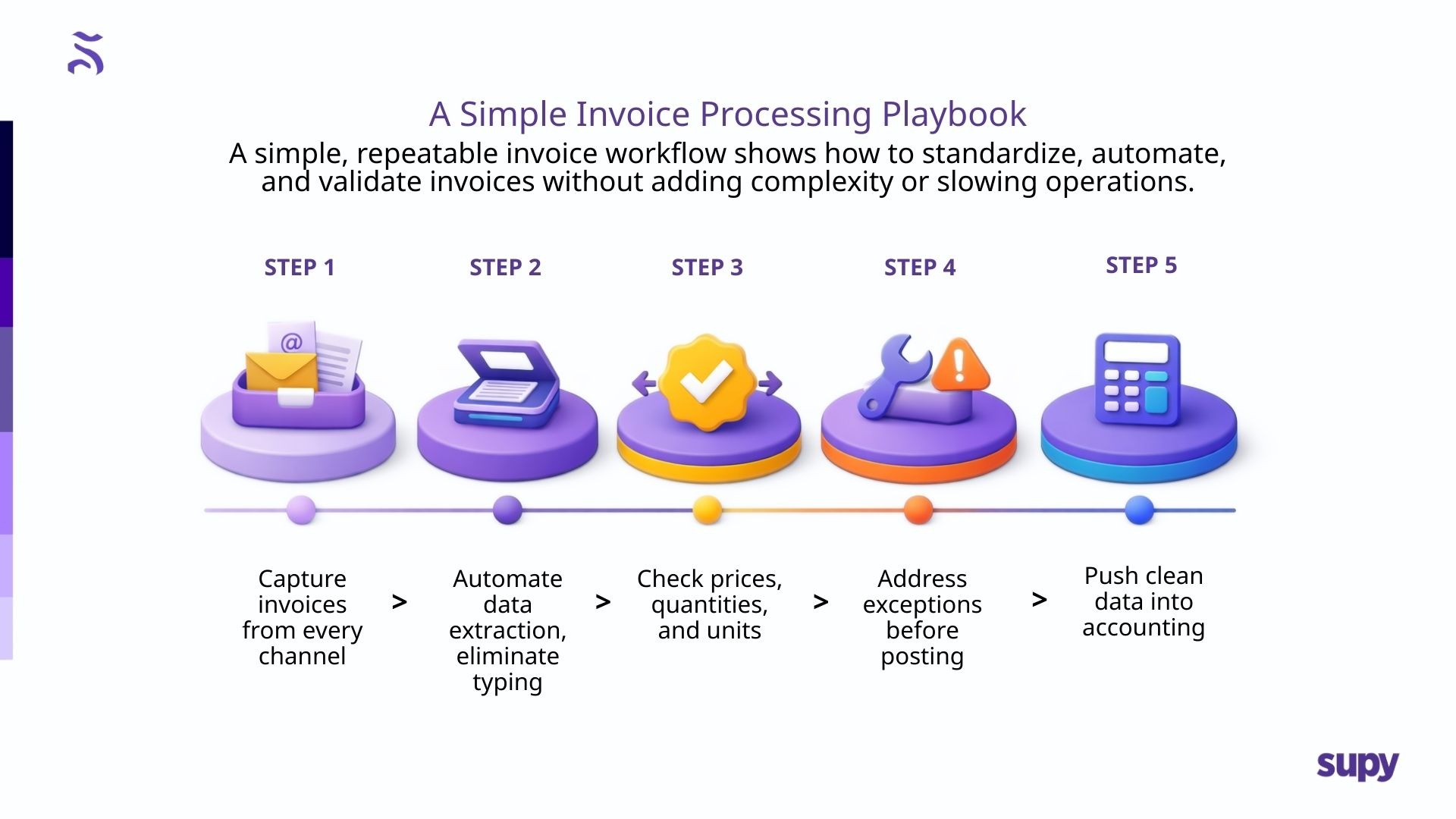
Hier ist ein einfaches „Playbook“, das Sie in Restaurants einführen können, ohne es zu verkomplizieren.
Schritt 1: Rechnungseingang standardisieren
Wählen Sie einen konsistenten Satz von Kanälen (E-Mail-Postfach + Scan + Upload). Das Ziel ist nicht perfektes Verhalten; es ist zuverlässige Erfassung.
Schritt 2: Extraktion automatisieren (Eingabe entfernen)
Rechnungsdetails werden automatisch in strukturierte Daten übertragen: Lieferantenname, Rechnungsnummer/-datum, Positionen, Steuern, Gesamtbeträge.
KI-basierte Rechnung-Empfangs-Tools lesen Rechnungen in verschiedenen Formaten und extrahieren Daten konsistent.
Schritt 3: Relevantes validieren
Die Validierung sollte sich auf hochwertige Kontrollen konzentrieren:
- Preisänderungen vs. dem zuletzt genehmigten Preis
- Mengenabweichungen vs. Wareneingang
- Packungsgrößenwechsel/Einheitenänderungen
- Fehlende Artikel oder unerwartete Substitutionen
Supy ermöglicht die Erfassung von Rechnungsdaten und die Identifikation von Preis-/Mengenabweichungen.
Schritt 4: Ausnahmen schnell lösen
Machen Sie es Teams einfach:
- Legitime Änderungen zu genehmigen
- Probleme je Lieferant zu kennzeichnen
- Gutschriften anzufordern, wenn nötig
- Einen Prüfpfad der Anpassungen zu pflegen
Schritt 5: Saubere Daten in die Buchhaltung synchronisieren
Sobald Rechnungen validiert sind, sollten sie direkt mit konsistenten Zuordnungen in die Buchhaltung fließen. Supy unterstützt Buchhaltungsintegrationen wie z. B. Xero.
Wo Automatisierung am meisten hilft (und wo Menschen noch wichtig sind)
Betreiber machen sich manchmal Sorgen, dass Automatisierung „Kontrollverlust“ bedeutet. In der Praxis passiert das Gegenteil, wenn Workflows richtig gestaltet werden.
Die Automatisierung sollte übernehmen:
- Extraktion und Formatierung
- Abgleich und positionsweise Vergleiche
- Ausnahmen kennzeichnen
- Strukturierte Buchungsvorbereitung
Menschen sollten übernehmen:
- Ausnahmen genehmigen
- Lieferantenkontakt und Gutschriftenrückforderung
- Richtlinienentscheidungen (was erlaubt ist, was nicht)
- Monatliche Überprüfung und Verantwortung
KI entfernt die Eingabe – sie entfernt nicht die Verantwortung.
Implementierung ohne Chaos: Ein einfacher Einführungsplan
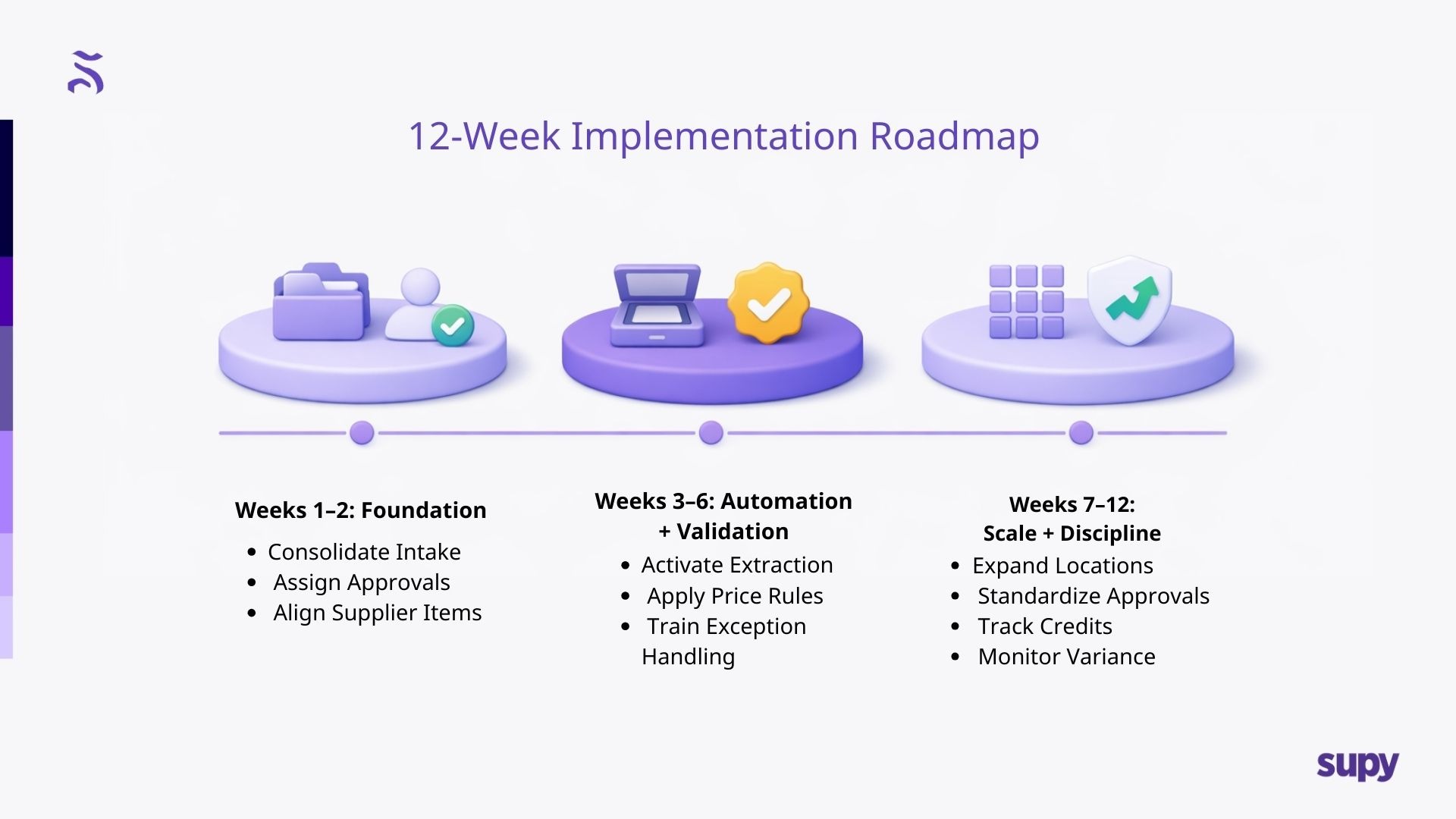
Für die meisten Gruppen ist die Rechnung-Automatisierung am einfachsten, wenn sie in einer kontrollierten Abfolge eingeführt wird.
Wochen 1 - 2: Grundlage
- Rechnungsquellen konsolidieren
- Festlegen, wer Ausnahmen genehmigt
- Lieferanten-Artikelstrukturen wo möglich angleichen
Wochen 3 - 6: Automatisierung + Validierung
- Rechnungsextraktion aktivieren
- Preis-/Mengenregeln implementieren
- Teams im Umgang mit Ausnahmen schulen
Wochen 7 - 12: Skalierung + Disziplin
- Auf weitere Standorte ausweiten
- Genehmigungsverhalten standardisieren
- Gutschriften, Streitzyklen und wiederkehrende Lieferantenprobleme verfolgen
Hier wechseln Sie von „wir haben Rechnungen digitalisiert“ zu echter Kostendisziplin.
Wie Supy manuelle Dateneingabe eliminiert (ohne zu übergriffig zu sein)
Für Betreiber, die Rechnung-Workflows modernisieren möchten, unterstützt Supy die Kernanforderungen eines sauberen Rechnung-Prozesses:
- KI-gestützte Rechnung-Erfassung, die Rechnungskopf- und Positionsdaten extrahiert
- Transparenz über Preise-/Mengenabweichungen, sodass Ausnahmen frühzeitig behandelt werden
- Integrationen mit bestehenden Tech-Stacks über das Integrationsplättform
- Buchhaltungsanbindung (z. B. Xero) zur Reduzierung von Nacharbeit und Verbesserung der Konsistenz
Der strategische Wert ist klar: weniger manueller Aufwand, sauberere Daten, schnellere Genehmigungen und bessere betriebliche Transparenz – besonders wenn Standorte und Rechnungsvolumen zunehmen.
Falls relevant, finden Sie Supys Rechnung-Empfangs-Funktion hier: Supy

.jpeg)